

Topic clusters are a way of organizing website content around a central subject, with a main pillar page supported by related articles that cover specific subtopics. These pages are connected through internal links, creating a hub-and-spoke structure that helps readers explore a subject and helps search engines understand the relationship between different pages.
Publishing individual articles without a clear structure can leave important topics disconnected and make it harder for readers to find related information. Topic clusters bring these pages together, help businesses cover subjects more comprehensively, and create a more organized website. Understanding how they work and how to build them can make your content strategy more effective. Let’s look at how topic clusters work and how you can create one.
What Are Topic Clusters in SEO?
Topic clusters in SEO are groups of related content built around one central subject. Instead of publishing articles as separate pieces, you organize them so each page covers a specific part of a broader topic. A main page introduces the subject, while supporting articles explore individual areas in more detail. Internal links connect these pages and create a clear content structure.
What Is a Pillar Page?
A pillar page is the main page of a topic cluster. It covers a broad subject and provides an overview of its important subtopics without going into every detail. It also links to supporting articles where readers can find more specific information.
For example, a website covering digital marketing might have a pillar page on SEO. It could introduce keyword research, technical SEO, link building, and content optimization, with separate articles explaining each topic in depth.
What Are Supporting or Cluster Pages?
Supporting pages, also called cluster pages, cover individual subtopics related to the main pillar page. Each article focuses on a specific subject and answers questions that readers may have about it.
Continuing with the SEO example, supporting articles could cover keyword research methods, technical SEO audits, link-building strategies, and on-page optimization. Each page adds more detail to the main subject rather than repeating the same information.
How the Hub-and-Spoke Model Connects Related Content
The hub-and-spoke model gives a topic cluster its structure. The pillar page acts as the hub, while supporting articles form the spokes around it. The hub links to relevant supporting pages, and those pages link back to the hub. Related articles can also link to one another when the connection is useful to readers.
This creates a connected group of pages instead of leaving every article on its own. Readers can move from a broad overview to specific information, while search engines can follow the links to understand how the pages relate to each other.
Why Topic Clusters Matters
A website may have useful articles on several related subjects, but without a clear structure, readers and search engines may struggle to understand how those pages connect. Topic clusters bring related content together and give each page a clear place within the wider subject. Here is how they support SEO.

Help Search Engines Understand Relationships Between Related Pages
Internal links show how different pages on your website are connected. When a pillar page links to relevant supporting articles, search engines can follow those connections and understand how the pages relate to the main subject. Clear relationships also make it easier to discover important pages across your website.
Build Broader and Deeper Coverage of a Subject
A single article cannot answer every question about a broad topic. Topic clusters allow you to cover individual subtopics in separate articles while keeping them connected to the main subject. This gives readers access to more detailed information and helps your website build comprehensive coverage around topics relevant to your business.
Improve Content Discovery Through Internal Links
Readers often need more than one piece of information before they understand a subject or make a decision. Relevant internal links guide them from the main page to supporting articles that answer their next questions.
For example, someone reading an SEO overview can follow a link to learn more about technical SEO or keyword research without having to search for those topics separately.
Support a More Organized Content Strategy
Topic clusters give you a clearer plan for creating and managing website content. You can identify which subjects need a pillar page, which supporting articles are missing, and where existing pages need improvement. This also reduces the chances of publishing multiple articles that target the same search intent.
How to Find and Build Topic Clusters
Building a topic cluster starts with choosing a subject worth covering and finding the questions people search for around it. You then organize those ideas into related groups and decide which pages should be created or updated. A little planning at this stage helps prevent unrelated articles and gives every page a clear purpose.
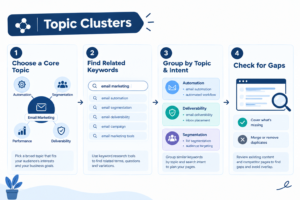
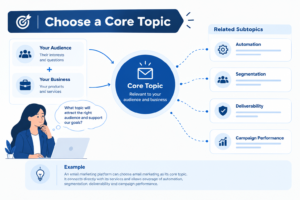
Choose a Core Topic Relevant to Your Audience and Business
Start by identifying a subject that connects your audience’s interests with your business offerings. It should be broad enough to cover several related subtopics but relevant enough to attract the right visitors.
For example, an email marketing platform could choose email marketing as its core topic. It connects directly with the platform’s services and gives it room to cover areas such as automation, segmentation, deliverability, and campaign performance.
Find Related Keywords and Subtopics Using Keyword Research
Once you have selected a core topic, research the keywords and questions people use when looking for information about it. Look for variations, related searches, and specific questions that could become supporting articles.
Tools such as Semrush and Ahrefs can help you find keyword ideas, check search volume, and explore competitor content. Google Search Console is useful for identifying queries your existing pages already appear for. Keyword Cupid can help group related keywords based on their relationships in search results.
Do not select keywords based on search volume alone. Consider what the searcher wants to know and whether the topic deserves a separate page.
A 2025 study involving 339 university students highlighted how website usability and information organisation affect users’ ability to find relevant information.
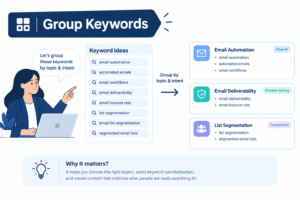
Group Keywords Based on Topic Relevance and Search Intent
After collecting keyword ideas, group them according to their subject and the purpose behind each search. Keywords that address the same question or satisfy similar search intent can often be covered on one page. Those requiring different explanations may need separate articles.
For example, searches related to email automation can form one group, while email deliverability and list segmentation can become separate groups. This makes it easier to decide which topics belong together and prevents several pages from competing for the same search intent.
Identify Content Gaps and Avoid Overlapping Topics
Before creating new articles, review the content already available on your website. You may find that some subtopics are already covered, while others have not been addressed properly. Competitor research can also reveal questions and subjects that your current content is missing.
Check whether existing pages serve the same purpose before planning another article. If two pages target nearly identical searches, consider improving or combining them instead of publishing another version. Focus on filling genuine content gaps rather than increasing the number of URLs on your website.
How to Structure a Hub-and-Spoke Content Model
Once you have grouped your topics and keywords, the next step is to decide how the pages will fit together. A hub-and-spoke content model gives each page a specific role and creates a clear path between the main subject and its supporting topics.
Hub Page: Create a Comprehensive Pillar Page Covering the Main Topic
The hub page is the central part of your topic cluster. It should introduce the main subject, cover its important areas, and direct readers to supporting articles for more detailed information.
Avoid trying to explain every subtopic in full on this page. Instead, provide enough context for readers to understand the subject and find the information they need. For an email marketing cluster, the hub could be a complete guide to email marketing, covering its purpose, benefits, strategies, and key components.
Spoke Pages: Plan Supporting Articles Around Specific Subtopics
Spoke pages provide detailed information about the individual areas introduced on the hub page. Each article should focus on one subtopic and answer a specific set of questions.
For example, the email marketing hub could link to separate articles on email automation, list segmentation, deliverability, and campaign measurement. Each article should offer useful information on its subject without repeating large portions of the pillar page.
Keyword Mapping: Assign a Primary Keyword and Distinct Search Intent to Each Page
Keyword mapping helps you decide which keywords belong to which page. Assign a primary keyword to the hub and relevant secondary keywords to its supporting articles. Check the search intent before finalizing the mapping so that each page serves a clear purpose.
For instance, the hub may target the broad keyword “email marketing,” while a supporting article targets “email marketing automation.” This keeps the pages focused on different aspects of the subject and reduces the risk of keyword cannibalization.
Internal Linking: Connect Supporting Articles to the Hub and Relevant Spokes
Internal links bring the entire cluster together. Link the hub page to its relevant supporting articles, and make sure each spoke links back to the hub. You can also connect related spoke pages when they provide useful additional information.
Use descriptive anchor text that tells readers what they can expect from the linked page. Avoid adding links just to increase their number. Each connection should help readers explore the subject and move naturally between related information.
Topic Cluster Template: A Practical Example
Let’s use email marketing to understand how a hub-and-spoke content model works in practice. Instead of publishing separate articles on different email marketing topics, you can organize them around one central page and connect them through relevant internal links.
Core Topic: Email Marketing
Email marketing is the main subject around which the cluster is built. It is broad enough to cover several related topics and relevant to businesses looking to improve their email campaigns.
Hub Page: Complete Guide to Email Marketing
The hub page provides an overview of email marketing, including how it works, its benefits, common strategies, and the role it plays in business communication. It also introduces the key subtopics and links to supporting articles for readers who want more detailed information.
Spoke Pages: Supporting Articles
The supporting articles cover specific areas of email marketing. Each page focuses on a separate topic and provides information that complements the main guide.
- Email Marketing Automation: Explains how automated emails work, how to set up workflows, and when businesses should use them.
- Email List Segmentation: Covers how to divide subscribers into groups based on their interests, behaviour, or preferences.
- Email Deliverability: Explains factors that affect email delivery and ways to prevent messages from landing in spam folders.
- Email Campaign Measurement: Covers important performance metrics such as open rates, click-through rates, and conversions.
- Email Marketing Best Practices: Discusses ways to write effective emails, maintain subscriber lists, and improve campaign performance.
Internal Linking: Connecting the Pages
The hub page should link to all five supporting articles from relevant sections. Each supporting article should also link back to the main email marketing guide. Where topics are closely related, you can connect those articles as well. For example, the email marketing automation article could link to the campaign measurement article because tracking results is an important part of managing automated campaigns.
A Reusable Topic Cluster Template
You can use the following structure to plan topic clusters for different subjects on your website.
| Component | What to Include |
|---|---|
| Core topic | The main subject you want to cover |
| Hub page | A comprehensive page introducing the core topic |
| Spoke page 1 | First supporting subtopic |
| Spoke page 2 | Second supporting subtopic |
| Spoke page 3 | Third supporting subtopic |
| Spoke page 4 | Fourth supporting subtopic |
| Spoke page 5 | Fifth supporting subtopic |
| Internal links | Links from the hub to relevant spokes, links back to the hub, and connections between related spokes |
Before publishing, check that every supporting page covers a distinct subject and contributes something useful to the main topic. You can expand the cluster as your audience’s needs grow, adding new articles when there are relevant questions or subtopics that your existing content does not cover.
Common Topic Clustering Mistakes to Avoid
Topic clusters need more than a group of related articles to work effectively. The topics, page structure, and internal links should all serve a clear purpose. Here are some common mistakes to avoid when creating topic clusters.
Choosing Topics That Have Little Relevance to the Business
A topic may have good search demand, but that does not mean it belongs on your website. Choosing subjects that have little connection to your products, services, or audience can attract visitors who are unlikely to become customers. Focus on topics that match your business expertise and address the information your target audience needs.
Creating Multiple Pages Targeting the Same Search Intent
Publishing several articles around similar keywords can create overlap when those pages answer the same questions. Search engines may struggle to determine which page is most relevant, and the pages may compete with one another in search results. Review keyword intent before creating new content and give each page a distinct purpose.
Publishing Supporting Articles Without a Clear Pillar Page
Supporting articles need a central page that connects them to the broader subject. Without a clear pillar page, related content can become a collection of separate articles with no defined structure. Create the main page first or identify an existing page that can serve as the hub.
Adding Internal Links Without Considering Their Relevance
Internal links should connect pages that offer useful context to one another. Linking unrelated articles simply to increase the number of internal links can confuse readers and weaken the content structure. Add links where they help readers explore a related subject or find more detailed information.
Creating Too Many Articles Without Sufficient Depth or Useful Information
Publishing more articles does not automatically make a topic cluster stronger. If supporting pages contain repetitive or shallow information, they add little value to the overall content.
Focus on answering specific questions clearly and providing useful details. Expand the cluster only when there are meaningful subtopics that deserve separate coverage.
How to Measure Topic Cluster Performance
Measuring topic cluster performance helps you understand whether your content is reaching the right audience and contributing to your website’s goals. Instead of evaluating only the pillar page, review the performance of the entire cluster, including its supporting articles. Here are the key areas to monitor.
| Performance Area | What to Measure | What It Helps You Understand |
|---|---|---|
| Organic Traffic and Keyword Visibility | Organic clicks, traffic, impressions, and search queries across cluster pages | Whether your content is attracting relevant visitors |
| Rankings and Impressions | Keyword positions and impressions for the hub and supporting pages | Whether individual pages are gaining search visibility |
| Internal Link Performance and Page Discovery | Internal links, incoming links, crawlability, and indexing | Whether search engines and readers can discover important pages |
| Conversions | Form submissions, demo requests, sign-ups, and purchases | Whether cluster pages contribute to business goals |
| Content Gaps and Expansion Opportunities | Missing topics, outdated information, and unanswered search queries | Which pages need updates and where new supporting content may be useful |
Frequently Asked Questions
Can Topic Clusters Improve Website Rankings?
Topic clusters can support SEO by organizing related content, improving internal linking, and helping search engines understand the relationship between pages. They do not guarantee higher rankings, but they create a clearer structure for covering relevant subjects.
Should Topic Clusters Be Created Before or After Publishing Blog Posts?
Topic clusters can be planned before publishing new content or created using existing blog posts. Planning them in advance helps maintain a clear content structure, while organizing existing articles can help identify gaps and opportunities for improvement.
How Often Should You Update a Topic Cluster?
Review your topic clusters regularly to check for outdated information, changes in search intent, and new questions from your audience. Update existing articles when information changes and add supporting pages when a relevant subtopic needs more detailed coverage.
Can One Website Have Multiple Topic Clusters?
Yes. A website can have multiple topic clusters based on its products, services, and audience interests. Each cluster should focus on a distinct subject, with its own pillar page and relevant supporting articles. These clusters can also connect where their topics overlap naturally.
Are Topic Clusters Useful for Small Websites?
Yes. Small websites can use topic clusters to organize content around a few important subjects. They do not need dozens of articles to get started. A focused pillar page and a handful of useful supporting articles can provide a clear structure that grows as the website develops.