

Structured data is not a ranking factor, and there is no solid evidence that it gets your content cited by AI Overviews, ChatGPT, or Perplexity. What it still does is make your pages eligible for rich results and help search engines understand who you are. Google keeps cutting rich result types, too: HowTo is gone, seven more were removed in June 2025, and FAQ rich results stopped appearing on May 7, 2026.
This guide walks through what structured data still does for SEO in 2026, what the data actually says about schema and AI search, and why the vendor claims don’t hold up. You’ll also see how to connect your entities with @id and sameAs, which schema types make sense for your kind of site, and how to implement, test, and measure your markup.
What Is Structured Data (and What It Isn’t)
Structured data is code that labels the content on a page so machines can read it without guessing. Schema.org is the shared vocabulary for those labels, covering things like products, articles, organisations, and events. JSON-LD is the format Google recommends for writing them, and it sits in a script block separate from your visible text.
It helps to keep three ideas apart. Structured data is the markup itself. Rich results are the enhanced search displays it can make you eligible for. A ranking factor is a signal that moves your position, and structured data isn’t one.
For example, an Organisation markup tells search engines your business name, website, logo, and official social profiles in a single, clear block, so they don’t have to infer it from your page text.
What Structured Data Does for Traditional SEO in 2026
Structured data is not a direct ranking factor. Adding markup won’t lift a page’s position on its own. What it does is give search engines a clear, labelled description of your content, and that supports three things.
- Rich result eligibility. Valid markup makes a page eligible for enhanced displays such as ratings, prices, or event details. Eligibility is not a guarantee, since Google decides when to show them.
- Entity clarity. Markup states who published a page, what a product is, and which organisation is behind it, so search engines don’t have to infer it from your text.
- Knowledge Graph signals. Consistent, accurate details about your brand or authors help Google connect your content to the right entities
These schema types still earn rich results:
| Schema Type | What It Can Unlock in Google Search |
|---|---|
| Product | Price and availability |
| Review | Star ratings |
| Article | Enhanced news and blog presentation |
| LocalBusiness | Local details and business information |
| Event | Dates and venues |
| BreadcrumbList | Clean site path in results |
| VideoObject | Video features in search results |
Google’s Structured Data Retirements: What Changed
Google has been steadily trimming the rich results it supports. The pattern is consistent: restrict a feature first, then remove it, then drop the reporting tools.
| Date | What Changed |
|---|---|
| 2023 | HowTo rich results were fully retired. |
| June 2025 | Seven further structured data types were removed from search appearance in one batch. |
| May 7, 2026 | FAQ rich results stopped appearing in Google Search. |
The FAQ change was rolled out in stages. Support in the Search Console rich results report and the Rich Results Test was removed in June 2026, and the Search Console API followed in August 2026.
A retired rich result does not make the markup invalid. FAQPage is still a valid schema type, and Google says unused structured data doesn’t hurt your rankings. Keeping it is harmless.
What to do now:
- Audit the markup already on your site, especially FAQ and HowTo.
- Keep it if it accurately matches the visible content on the page.
- Don’t build a new strategy around retired types, and don’t count them as wins in your reporting.
Does Schema Help AI Search? What the Evidence Says
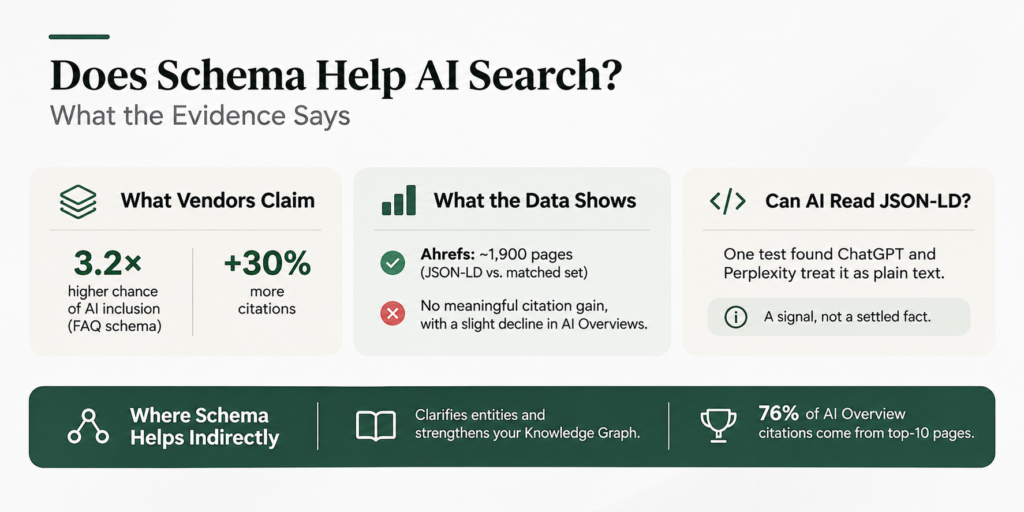
Many sites add schema hoping AI search will cite them, but the claims and the data don’t align. Here is how they compare.
What Vendors Claim
Some pages say FAQPage markup makes you 3.2x more likely to appear in AI Overviews, or that schema lifts citations by 30%. Most of these figures come from companies selling AI visibility services, and few explain how they were measured.
What the Data Shows
Ahrefs tracked about 1,900 pages that added JSON-LD against a matched set that didn’t. It found no meaningful increase in citations from ChatGPT or Google AI Mode, and a small decline in AI Overview appearances.
It’s also unclear whether chatbots parse JSON-LD at all. One experiment found ChatGPT and Perplexity treat it as plain text, but that comes from a single test, so treat it as a signal, not a settled fact.
Where Schema Helps Indirectly
Schema still helps Google understand your entities and strengthens your Knowledge Graph presence. Rankings matter too, since one analysis found 76% of AI Overview citations come from top-10 pages.
Entity-First Structured Data
If schema isn’t a citation shortcut, its real value is entity clarity. An entity-first approach treats your markup as one connected description of who you are, not a set of isolated snippets on separate pages.
Connect Your Entities with @id and sameAs
Give each core entity a stable identifier using the @id property, usually its own URL. Your Organization, your WebSite, and each author (Person) get one ID, and every page refers back to that same ID instead of redefining the entity.
The sameAs property links an entity to its official profiles elsewhere, such as LinkedIn, Wikipedia, or Crunchbase.
This helps search engines confirm that your brand here is the same one they know from other sources.
In practice, the pieces connect like this. Your WebSite points to your Organization as its publisher. Each Article points to a Person as its author and to the same Organization as its publisher. The Person and the Organization each carry sameAs links to their official profiles.
Support E-E-A-T with Author and Publisher Markup
Author and publisher markup doesn’t create expertise or trust, and it isn’t an E-E-A-T score. It makes the signals you already have easier for machines to verify: who wrote the content, their credentials, and which organization stands behind it.
Make sure the markup matches what readers see on the page, such as the author name, bio, and publisher details.
Which Schema to Prioritize by Site Type
You don’t need every schema type. The right starting set depends on what your site does, so start with the types that match your business and skip the rest.
Ecommerce
- Must-have: Product with Offer, review and rating markup (where genuine), BreadcrumbList, and Organization.
- Skip: FAQPage and HowTo as rich result tactics, since both are retired.
Local business
- Must-have: LocalBusiness (use the most specific subtype), with address, phone, opening hours, and sameAs links.
- Skip: Reviews you’ve written about yourself, and any details not shown on the page.
SaaS
- Must-have: Organization, WebSite and SoftwareApplication, plus Article for your blog.
- Skip: Self-serving review markup on your own company pages.
Publisher or blog
- Must-have: Article or NewsArticle, Person for authors, Organization for the publisher, BreadcrumbList, and VideoObject if you publish video.
- Skip: HowTo and FAQPage markup added only for search appearance.
Service business
- Must-have: Organization or LocalBusiness, Service, and Person for key experts.
- Skip: Types that don’t describe what you actually offer.
How to Implement Structured Data and Avoid Common Mistakes
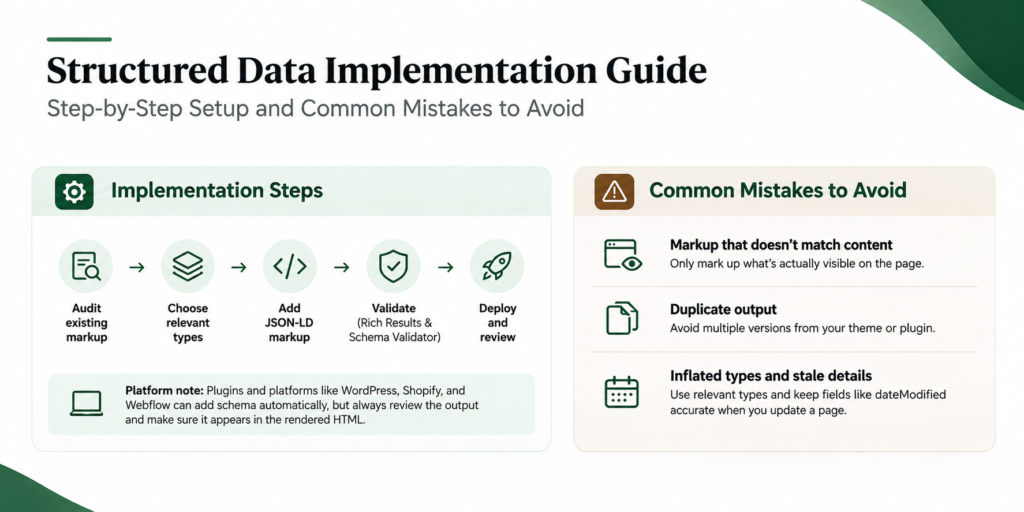
Implementing schema is straightforward if you work in a clear order and check your results before and after you publish.
-
Implementation Steps
Start by auditing what’s already on your site, since themes and plugins often add markup without you noticing. Then choose the types that match your pages, write them in JSON-LD, validate them with the Rich Results Test and Schema Markup Validator, and deploy.
Your platform affects how much of this is manual. WordPress SEO plugins, Shopify themes, and Webflow’s built-in settings can generate common types automatically, but you should still review the output. Whichever route you take, make sure the schema appears in the rendered HTML. If it’s injected late by JavaScript, some crawlers may miss it.
-
Mistakes to Avoid
The most common mistake is markup that doesn’t match the visible content. Google treats this as misleading, so only mark up what readers can actually see on the page.
Duplicate output is another frequent problem. A theme and a plugin can each add their own schema, creating conflicting versions of the same entity.
Finally, avoid inflated types and stale details. Don’t choose a type just because it sounds impressive, and keep fields like dateModified accurate when you update a page.
How to Test and Measure Impact
Start by checking that your markup is valid. The Rich Results Test shows whether a page is eligible for Google’s rich results, and the Schema Markup Validator checks your markup against the full schema.org vocabulary. Search Console’s enhancement reports then flag errors and warnings across your whole site.
To measure impact, compare impressions and click-through rate for the affected pages before and after you deploy. Change one thing at a time so you know what caused any shift.
Be careful with AI citations. Answers vary between runs, so a single prompt check tells you very little. Track a set of prompts over time instead.
FAQs
Can wrong structured data get my site penalized?
Misleading markup can trigger a manual action. It removes your rich result eligibility but doesn’t affect how your pages rank.
Do I need a developer to add schema?
Not always. WordPress plugins, Shopify themes, and Webflow settings can generate common types, but you should review the output.
How often should I update my schema?
Whenever the page content changes, such as prices, dates, authors, or business details. Check it again after site redesigns or plugin updates.
Do small websites need structured data?
Yes, if you want rich result eligibility and clearer entity signals. Start with Organization and the type that matches your main pages.