Ask ChatGPT or Gemini about your company, and you might get a flat-out wrong answer, the wrong industry, a competitor’s product listed as yours, or a pricing model that hasn’t been accurate in two years. When AI gets your brand wrong, the instinct is to panic. The better question is whether this is a one-off hallucination or a repeatable pattern the model keeps producing across sessions and platforms.
That distinction matters because the fix is different in each case. You can’t log into ChatGPT or Gemini and edit what they say about you; there’s no correction form for a model’s output. What you can do is fix the information these systems are actually learning from: your own site, the third-party sources citing you, and the entity databases (Wikipedia, Wikidata, Crunchbase) that anchor how AI understands who you are.
This will walk through how to diagnose the error, trace it to its source, correct it where it lives, and make sure the fix actually sticks.
Why AI Gets Brands Wrong
AI systems don’t have a single “brand file” they check before answering. Instead, they stitch a response together from several overlapping signals, each pulling in a different direction if they disagree.
The five signals that shape how AI describes your brand:
- Training data: what the model learned during its original training run, which can be a year or more out of date by the time you’re reading this.
- Retrieval sources: live web content the model pulls in real time (search-grounded tools like Perplexity and ChatGPT browsing rely heavily on this).
- Trusted publishers: news outlets, review sites, and industry publications the model weighs as credible.
- Structured/entity data: Wikipedia, Wikidata, Crunchbase, and Knowledge Panel entries that anchor factual claims about who you are.
- Repeated mentions: the more consistently the same fact appears across sources, the more the model treats it as reliable.
Persistent errors usually come from weak or conflicting source signals, not a random model failure. If your Wikidata entry says one thing, a 2022 press release says another, and your current homepage says a third, the model doesn’t know which to trust. It picks whichever signal is strongest, most repeated, or most recent, and that’s not always the accurate one.
Step 1: Diagnose: Is It a Hallucination or a Pattern?
Before you fix anything, find out what you’re actually dealing with. A single strange answer could be a one-off hallucination that won’t repeat. A wrong answer that shows up consistently is a signal problem worth tracing and correcting.
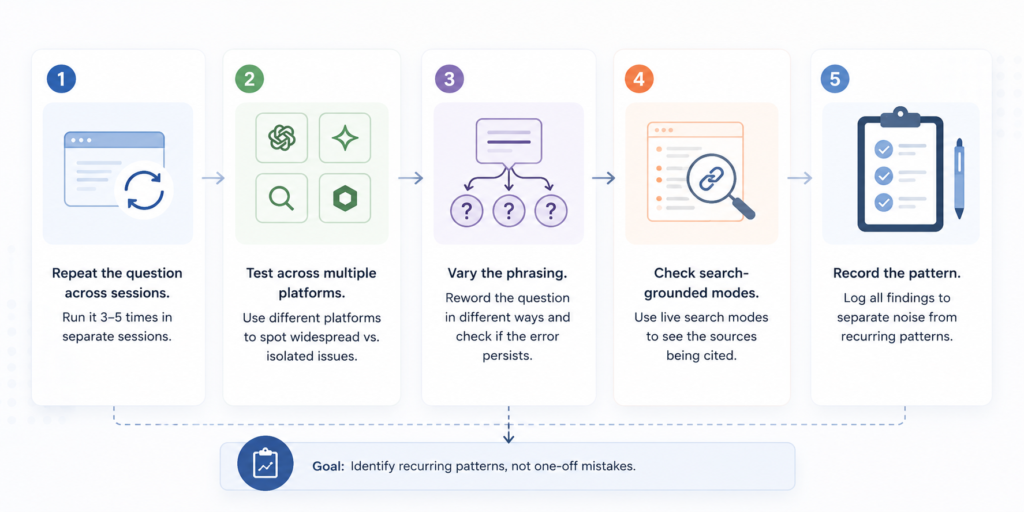
Repeat the Question Across Sessions: Run the same question 3–5 times across separate sessions. A one-time slip usually won’t survive repeated testing if the model corrects itself most of the time; you’re looking at noise, not a pattern.
Test Across Multiple Platforms: Test the identical prompt across ChatGPT, Gemini, Perplexity, and Copilot; each draws on different training data and retrieval sources. An error on every platform points to a widespread source problem; an error isolated to one platform points somewhere narrower.
Vary the phrasing: Reword the question to see if the error survives. For example: “What industry is [Brand] in?” → “What does [Brand] sell?” → “Who are [Brand]’s competitors?” If the same wrong answer surfaces across all three, the model isn’t confused by phrasing; it’s confidently repeating something it believes to be true.
Check Search-Grounded Modes: Use Perplexity and ChatGPT’s browsing mode to see exactly which sources the AI cites. This is often the fastest way to catch a bad source in the act.
Record the Pattern Log that you find each time you test. The goal isn’t to catch AI being wrong once; it’s to separate random mistakes from a recurring pattern, because only the pattern is worth fixing at the source.
Step 2: Trace the Source
Once you’ve confirmed a pattern, audit where the AI is pulling the wrong information from. A SaaS company once found its outdated per-seat pricing still being cited by AI tools, traced back to a 2022 review-site article that kept ranking on page one long after the pricing changed.
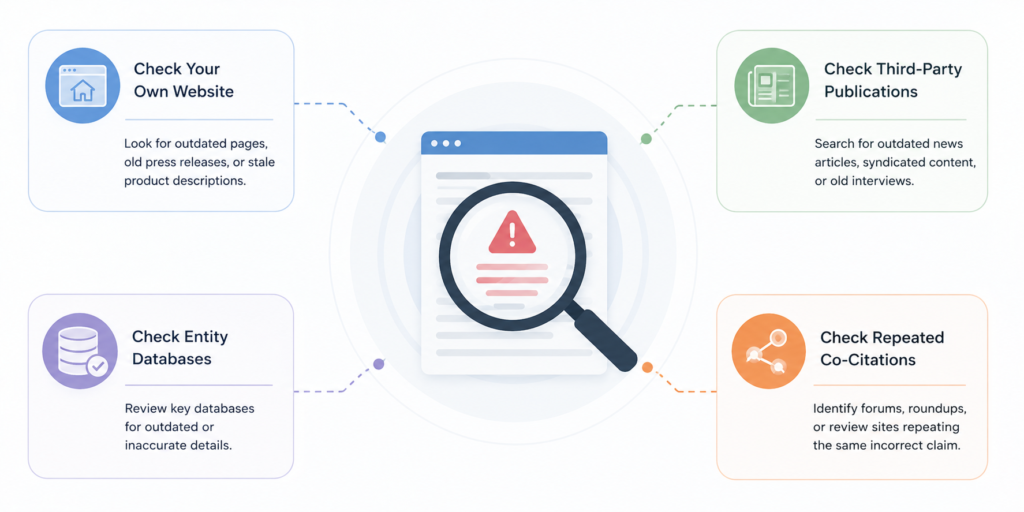
- Check Your Own Website: Look for outdated pages, old press releases, or stale product descriptions still live or indexed.
- Check Third-Party Publications Search for outdated news articles, syndicated content, or old interviews still circulating.
- Check Entity Databases: Review Wikipedia, Wikidata, Crunchbase, G2, LinkedIn, and Google Knowledge Panel for outdated details.
- Check Repeated Co-Citations: Identify forums, roundups, or review sites where the same incorrect claim keeps getting repeated.
 Step 3: Correct the Source, Not the Model
You can’t edit what ChatGPT or Gemini says directly; there’s no correction form for a model’s output. Corrections have to happen upstream, in the sources these models actually draw from.
Fix Owned Pages: Update your homepage, About page, product pages, and schema markup. A stale description or knows About field can keep feeding outdated facts to any system reading structured data.
| Field | Before | After |
|---|---|---|
| Description | Acme Analytics provides on-premise reporting tools for enterprise IT teams. | Acme Analytics provides cloud-based analytics and reporting tools for mid-market and enterprise teams. |
| knowsAbout |
|
|
Correct Trusted Third-Party Sources: Submit corrections to Wikipedia, request updates from journalists, and fix listings on Crunchbase, G2, and LinkedIn.
Update Entity Information Claim and correct your Google Business Profile, Knowledge Panel, and Wikidata entry. Wikidata errors are easy to overlook since they live in structured properties, not readable text.
Example: a brand’s Wikidata property P452 (industry) still lists “on-premise software” years after shifting to SaaS. Correcting P452 directly affects how AI systems referencing Wikidata categorize the brand.
Clean Up Outdated or Conflicting Content. Remove or update zombie pages that contradict your current positioning; an outdated page still ranking is a live signal working against you.
Step 4: Reinforce the Right Signals
Fixing the source isn’t the end of the work; the old, incorrect version doesn’t disappear just because you corrected it. You need to actively strengthen the right information until it outweighs what’s already out there.
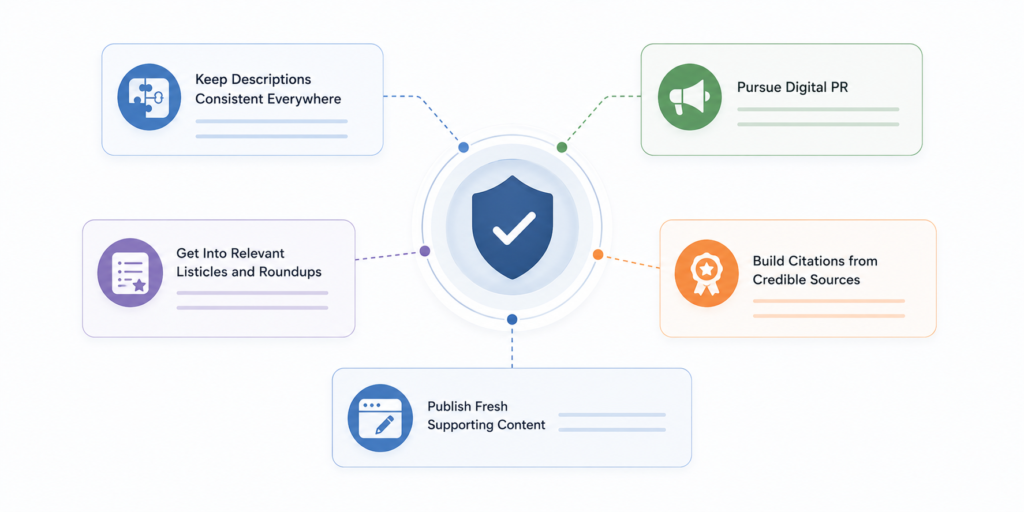
- Keep Descriptions Consistent Everywhere: Make sure your entity descriptions match word-for-word (or close to it) across your website, Wikidata, Crunchbase, G2, and LinkedIn. Inconsistency between platforms is exactly the kind of conflicting signal that got you into this problem in the first place.
- Pursue Digital PR: Generate fresh, accurate mentions through digital PR; new coverage naturally outweighs old, stale articles simply by being more recent and more repeated.
- Get Into Relevant Listicles and Roundups Earning placement in industry listicles and roundups adds repeated, current mentions of the correct facts across multiple third-party sources at once.
- Build Citations from Credible Sources: Prioritize citations from credible, industry-recognized publications that carry more weight as trusted signals than lower-authority sites repeating the same claim.
- Publish Fresh Supporting Content: Publish content on your own site that reinforces the correct facts directly. This gives AI systems a current, authoritative source to point to instead of the outdated one.
 Step 5: Monitor for Regression
Correcting the source doesn’t guarantee the fix holds. AI systems retrain, re-crawl, and re-index on their own schedules, which means an old error can resurface even after you’ve done everything right.
- Re-Test on a Regular Schedule: Re-run your important prompts weekly or monthly, the same way you did during the diagnosis stage. This is the only reliable way to confirm a correction has actually taken effect across platforms.
- Monitor Citations and Mentions Continuously. Treat citation and brand-mention monitoring as an ongoing practice, not a one-time check after you’ve made corrections. New third-party content can reintroduce the same error you just fixed.
- Refresh Key Pages: Periodically Revisit and update your most important pages on a regular cycle, even when nothing seems wrong. Stale content is what let the error take hold in the first place, and it can do so again.
- Corrections take time and require ongoing monitoring, not a single fix-and-forget action. A model reflecting the right information today doesn’t guarantee it still will in three months.
Common Mistakes to Avoid
A few missteps show up repeatedly when brands try to fix how AI represents them:
- Treating one wrong answer as a crisis. A single strange response is often noise, not a pattern that reacts to consistency, not to one bad session.
- Expecting instant changes after making corrections. Models don’t update in real time. A fix made today may not surface in AI outputs for weeks or months, depending on the platform’s retraining or grounding cycle.
- Only fixing one page instead of the full source ecosystem. Updating your homepage while an outdated Wikidata entry or old press release still circulates leaves the conflicting signal in place.
- Ignoring third-party inaccuracies while only fixing owned pages. Your own site is the easiest thing to control, but it’s rarely the only source the model is drawing from.
- Frequently changing brand positioning. Repositioning too often creates new conflicting signals before the old ones have even resolved, extending the timeline rather than shortening it.
FAQ
Can you report a mistake directly to ChatGPT or Gemini?
No, there’s no correction form for a model’s output. The only lasting fix is correcting the sources it draws from.
How long does it take for AI to reflect a correction?
It varies by platform. Search-grounded tools like Perplexity or ChatGPT’s browsing mode can reflect changes within days. Models relying on training data can take months, since that requires a retraining or grounding refresh.
Why does AI still show outdated information after my website is updated?
Your site has only one signal. If third-party articles or old press releases still contain the outdated claim, the model may keep weighting those sources even after your page is fixed.
Does correcting Wikipedia or Wikidata actually influence AI answers?
Yes, but not instantly. A Wikidata correction made in January typically won’t surface in model outputs until the next retraining or grounding refresh cycle, often 2–6 months later, depending on the platform.
