AI bot crawl tracking means verifying, through server logs or CDN data, whether bots like GPTBot, ClaudeBot, PerplexityBot, and Google Extended actually visited your pages. Allowing a bot in robots.txt only grants permission. Log data proves the visit. Both checks matter for AI visibility.
In this guide, you will learn which AI bots matter, where to find their crawl data, how to read server logs and CDN dashboards step by step, what crawl-frequency patterns actually signal, which tools can automate the process, and how AI bot crawling compares to traditional search engine crawling.
Key Takeaways
- Robots.txt grants permission only. It never confirms an actual visit.
- Four bots drive most AI crawl traffic: GPTBot, ClaudeBot, PerplexityBot, and Google-Extended.
- Server logs give the most granular proof of a crawl. CDN dashboards give the fastest classification.
- User-agent strings can be spoofed. IP verification through reverse DNS closes that gap.
- Zero crawl activity despite open access points to a specific, fixable cause.
- Recurring monitoring, not a one-time check, is what turns log data into a useful signal.
Why Allowing a Bot ≠ Proving It Crawled
Robots.txt is a permission file, not an activity report. It tells a bot what it may access. It says nothing about what the bot did access.
Many sites open their doors to GPTBot or ClaudeBot and assume the job is done. That assumption is incomplete. A bot can be fully permitted and still never show up, especially on low-authority pages, orphaned content, or pages with weak internal linking.
The Gap Between Permission and Behavior
Permission is a static rule. Crawl behavior is dynamic and depends on page authority, sitemap freshness, internal link depth, and how often the bot’s owner refreshes its index. Two pages with identical robots.txt rules can have completely different crawl histories.
Why This Gap Matters for AI Visibility
AI visibility work depends on proof, not assumptions. If a page is never crawled, it cannot appear in AI-generated answers, regardless of how well it is optimized. Measuring crawl activity closes the loop between access and outcome. For the access side of this equation (how to configure robots.txt and server rules to let these bots in), see the companion guide on managing AI crawler access.
Which AI Bots to Track
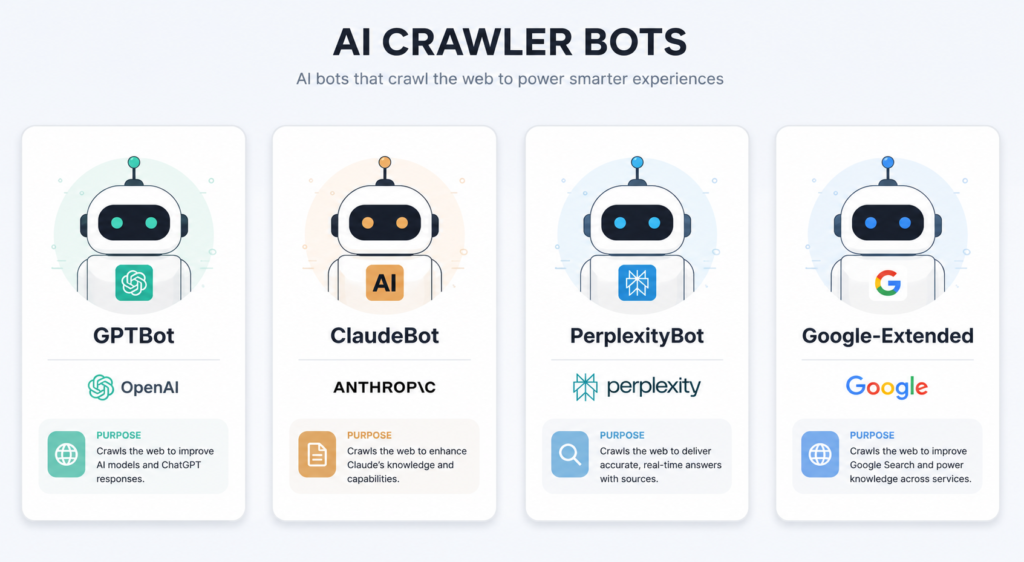
Four bots account for most AI-driven crawl traffic today. Each serves a different purpose, and each leaves a distinct signature in server logs.
GPTBot (OpenAI)
GPTBot collects web content to train and improve OpenAI’s models. Its user-agent string is GPTBot, and it typically operates from published OpenAI IP ranges.
ClaudeBot (Anthropic)
ClaudeBot crawls public content for Anthropic’s model training and improvement. Its user-agent string includes it. Anthropic also runs a separate agent, Claude-User, tied to live user actions and includes it. Bulk training crawls.
PerplexityBot
PerplexityBot crawls content to support Perplexity’s answer engine, including both indexing and live retrieval for user queries. Its user-agent string includes PerplexityBot.
Google-Extended
Google-Extended is a control token, not a separate crawler. Adding it to robots.txt lets site owners opt out of having content used for Gemini and Vertex AI training, separate from standard Googlebot indexing.
| Bot | Company | User-Agent Signature | Primary Purpose |
|---|---|---|---|
| GPTBot | OpenAI | GPTBot |
Model training |
| ClaudeBot | Anthropic | ClaudeBot |
Model training |
| PerplexityBot | Perplexity | PerplexityBot |
Indexing and live answer retrieval |
| Google-Extended | Controlled via token, not a crawler UA | AI training opt-out control |
Where to Find the Data: Server Logs vs CDN Analytics
Two data sources reveal crawl activity: raw server logs and CDN-level bot analytics. Each fits a different site setup.
Raw Server Access Logs
Apache and Nginx write every request to an access log, including the user-agent string, IP address, timestamp, and requested URL. These logs give the most granular, unfiltered record of bot activity.
CDN-Level Logs
Cloudflare, Akamai, and Fastly classify traffic at the edge, before it reaches the origin server. Their dashboards often label known bots automatically, removing the need for manual filtering.
Choosing the Right Source
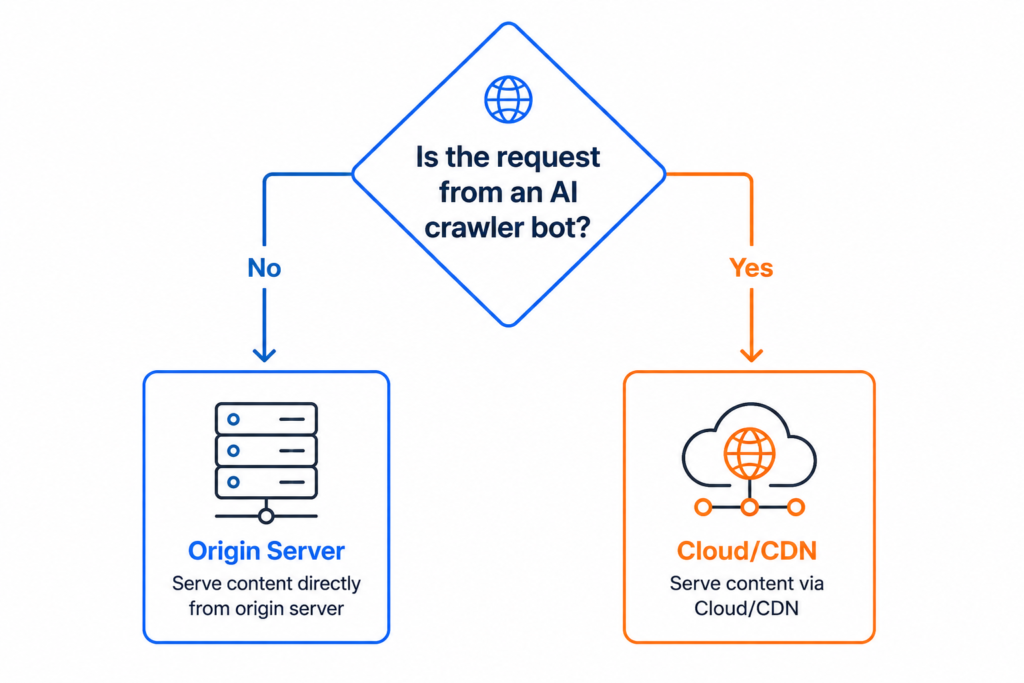
High-traffic sites on a CDN should start with CDN bot analytics; the classification work is already done. Sites without a CDN, or those needing IP-level verification, should go directly to server logs. Larger technical teams often use both together: CDN dashboards for daily monitoring, server logs for deeper audits.
Step-by-Step: Reading Server Logs for AI Bot Activity
Step 1: Locate and Access Your Log Files
Server logs typically live at /var/log/apache2/access.log or /var/log/nginx/access.log on Linux hosting. Managed hosting platforms usually expose logs through a dashboard or downloadable export.
Step 2: Filter by Known AI Bot User-Agents
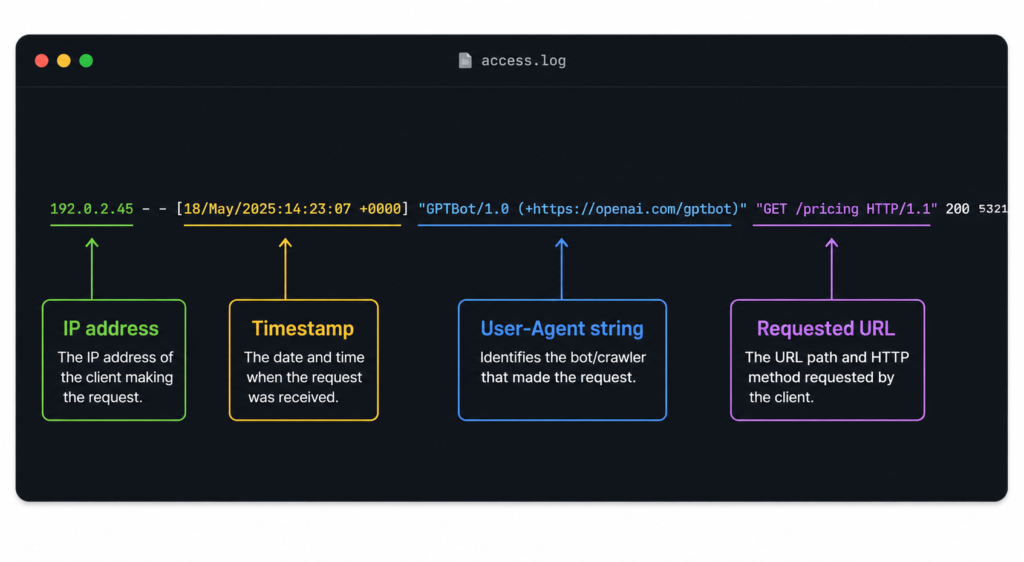 Use
Use grep to isolate bot traffic from the full log file:
grep -i "GPTBot" access.log
grep -i "ClaudeBot" access.log
grep -i "PerplexityBot" access.log
Each command returns every logged request from that bot, including the exact URL and timestamp.
Step 3: Verify Bots via Reverse DNS or IP Ranges
User-agent strings can be spoofed. Confirm authenticity by running a reverse DNS lookup on the requesting IP address and checking it against the bot owner’s published IP ranges. OpenAI, Anthropic, and Perplexity each publish these ranges for verification.
Step 4: Log the Hits: Frequency, Pages, Timestamps
Record three data points per bot: how often it visits, which pages it targets, and when the visits occur. A simple spreadsheet with bot name, URL, and timestamp columns is enough to start spotting patterns.
Step-by-Step: Setting Up CDN Bot Analytics
Step 1: Enable Bot Analytics in Your CDN Dashboard
Cloudflare’s Security > Bots section, for example, classifies incoming traffic and labels verified bots automatically. Enable this feature if it is not already active.
Step 2: Set Up Filters or Alerts for the Target Bots
Create saved filters for GPTBot, ClaudeBot, and PerplexityBot traffic. Some CDNs support real-time alerts, useful for tracking crawl activity immediately after a content update.
Step 3: Export or Dashboard the Data for Recurring Checks
Export filtered data on a weekly or monthly schedule, or build a persistent dashboard view. Recurring checks matter more than a single snapshot, since crawl frequency changes over time.
Tools That Can Automate AI Bot Crawl Tracking
Manual log filtering works, but several tools remove the repetitive part of the process.
Cloudflare Radar and Bot Analytics
Cloudflare’s dashboard auto-classifies verified bots, including the major AI crawlers, without needing manual user-agent filters. It works well for sites already on Cloudflare’s network.
Screaming Frog Log File Analyser
This desktop tool imports raw server logs and lets you filter by user-agent, view crawl frequency per URL, and cross-reference crawled pages against your sitemap. It suits teams that need offline, repeatable log audits.
Botify and Similar Enterprise Platforms
Enterprise log analysis platforms like Botify combine crawl data with page performance metrics, useful for larger sites tracking AI bot activity alongside traditional SEO crawl budgets.
Custom Scripts for Recurring Reports
A scheduled script that runs the grep filters from the earlier steps and outputs a weekly summary works for teams without budget for a dedicated tool. This keeps tracking consistent without manual log pulls every time.
AI Bot Crawling vs Traditional Search Engine Crawling
AI bot crawling and traditional search engine crawling share the same underlying mechanism, but the purpose and cadence differ.
Googlebot crawls to build and refresh a search index, following a well-documented crawl budget model tied to page authority and update frequency. AI bots like GPTBot and ClaudeBot crawl primarily to gather training data, which means their visits can be less frequent and less tied to your internal linking signals than Googlebot’s.
PerplexityBot is the exception. It crawls for both indexing and live, query-time retrieval, giving it a pattern closer to a traditional search crawler than a training-focused one. This distinction matters when interpreting frequency data: a quiet GPTBot log does not carry the same weight as a quiet Google Bot log.
Crawl rate expectations should be set separately for each bot type rather than borrowed from Googlebot benchmarks. A site accustomed to daily Googlebot visits on its top pages may see GPTBot or ClaudeBot appear only weekly or in irregular bursts tied to broader model training cycles rather than individual page changes. Treating that lower frequency as underperformance leads to the wrong fix. The correct comparison is the bot against its own historical pattern on your site, not against Googlebot’s crawl rate.
What Crawl-Frequency Signals Actually Tell You
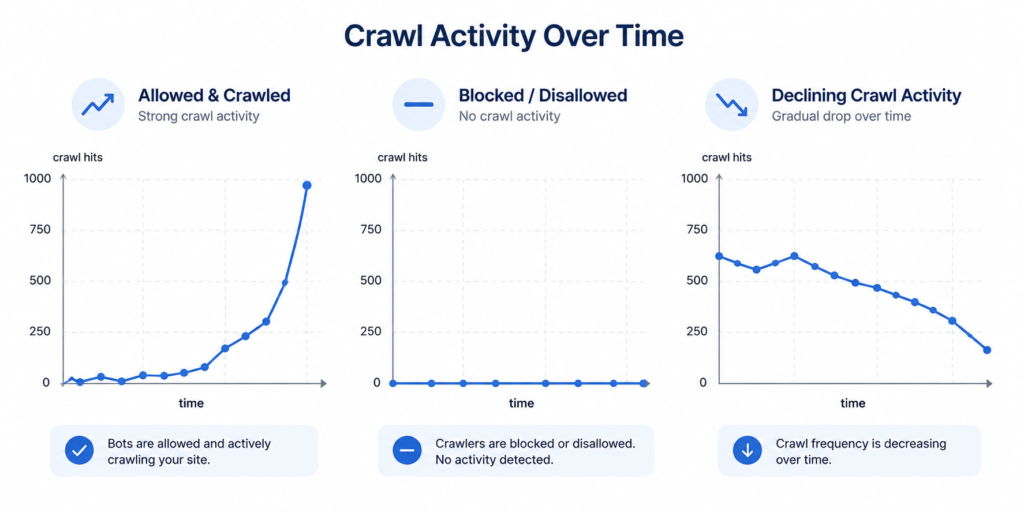
Raw hit counts are only useful once compared against expectations for the page.
High Frequency on Key Pages Signals Active Interest
Pages crawled repeatedly by GPTBot or ClaudeBot are being actively considered for inclusion in model outputs. This is the strongest positive signal available in log data.
Zero Hits Despite Robots.txt Access Signals a Problem
A page open to a bot but never visited points to a specific cause: weak internal linking, sitemap exclusion, low authority, or crawl budget limits. Each cause has a different fix, so this signal should trigger investigation, not assumption.
Pattern Changes Reveal Content Impact
A spike in crawl frequency after a content update indicates the bot noticed the change. A steady decline over months can indicate falling authority or a technical access issue introduced elsewhere on the site.
Building a Recurring AI Bot Crawl Report
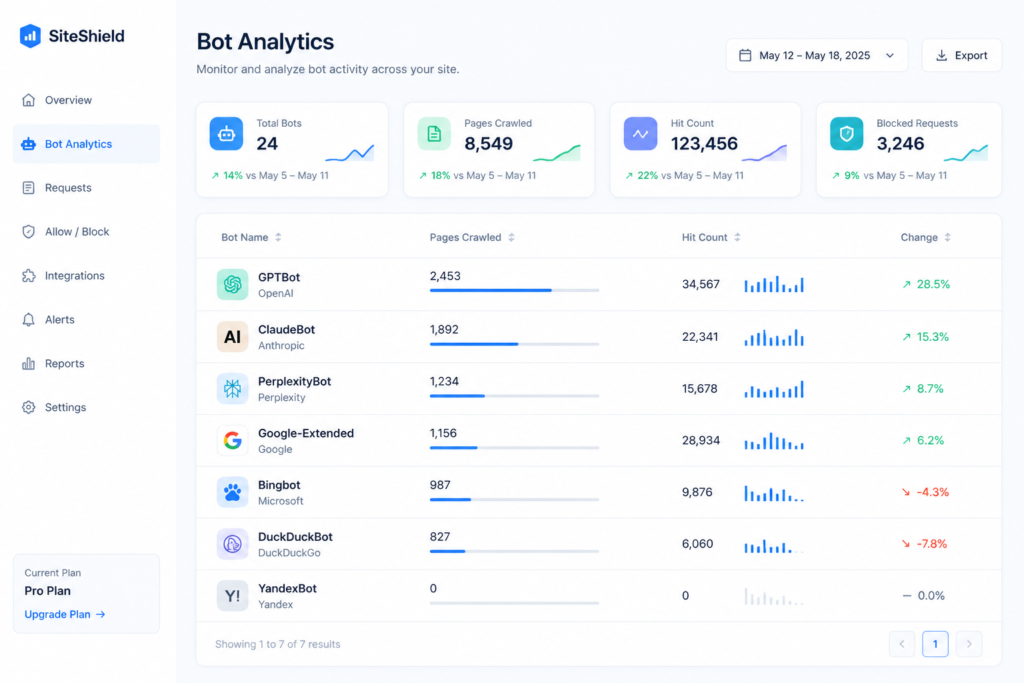
A one-time log check tells you what happened once. A recurring report tells you what is changing.
Set a fixed cadence, weekly for high-priority pages and monthly for the rest of the site. Each report should track four columns: bot name, pages crawled, hit count, and change from the previous period. Flag any page that drops to zero hits after previously showing regular activity; that shift usually points to a new technical issue rather than normal fluctuation. Over two or three reporting cycles, this data starts showing which content types and page depths attract the most AI bot attention, which can then guide where to focus future content and internal linking work.
Connecting Crawl Data to AI Referral Traffic
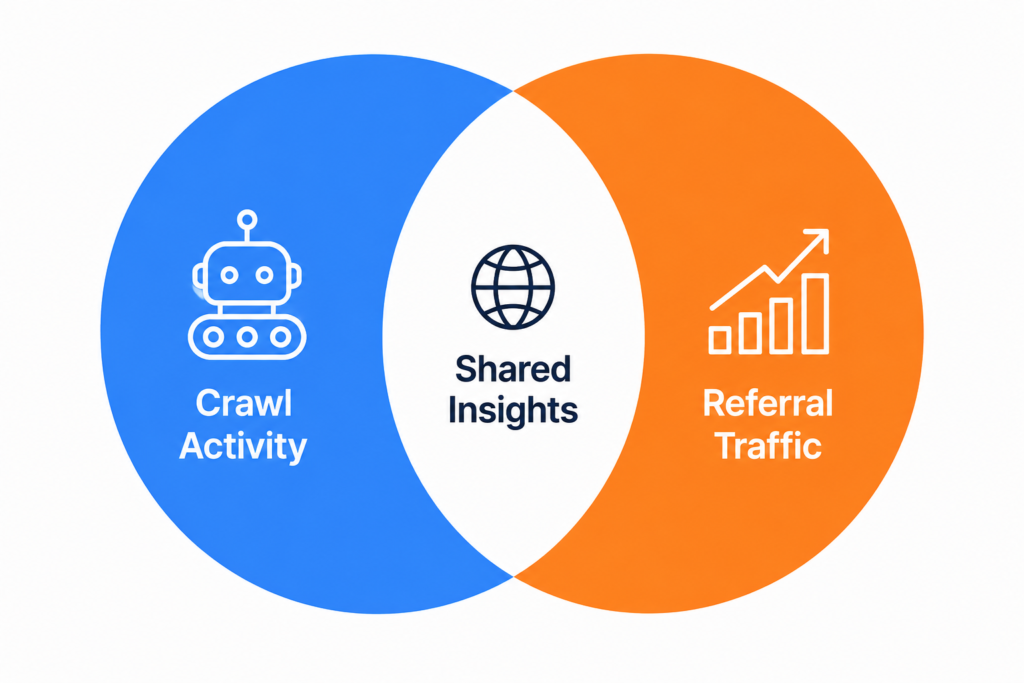
Crawl logs answer one question: did the bot visit? A second, related question matters just as much: did that visit turn into referral traffic from the AI platform itself?
Cross-referencing crawl logs against GA4 AI referral data closes this loop. A page with strong, consistent GPTBot or PerplexityBot crawl activity but no matching referral traffic from ChatGPT or Perplexity suggests the content was seen but not selected for citation in an actual answer. That is a content or authority gap, not a crawl gap.
The reverse pattern is also worth watching. Referral traffic appearing from an AI platform with no recent crawl activity on that page in the logs usually means the bot crawled before the current logging window started, or the answer engine is pulling from a cached or previously indexed version of the page. Either way, pairing crawl data with referral data gives a fuller picture than either source alone.
Run this cross-reference on the same cadence as the recurring crawl report, monthly at minimum, so both data sets stay aligned to the same reporting period.
Common Mistakes to Avoid
- Treating robots.txt permission as proof of a completed crawl.
- Trusting user-agent strings without IP or reverse DNS verification.
- Checking logs once and never repeating the process.
- Ignoring CDN-level bot classification when it is already available.
- Comparing crawl frequency across pages without accounting for authority differences.
Quick Checklist
- Confirm robots.txt allows GPTBot, ClaudeBot, PerplexityBot, and Google Extended where intended.
- Pull server logs or CDN bot analytics for the target bots.
- Verify user-agent hits against published IP ranges.
- Record frequency, pages crawled, and timestamps.
- Compare zero-hit pages against sitemap and internal link structure.
- Set up a recurring weekly or monthly reporting cadence.
Tracking AI bot crawls is not a one-time setup task. Bot behavior shifts as models retrain, as CDN providers update their classification rules, and as your own site’s authority and internal linking evolve. Building the habit of checking logs on a fixed schedule, and pairing that data with referral traffic where possible, turns a single audit into an ongoing measurement system rather than a one-off report that goes stale within a few weeks.
Frequently Asked Questions?
-
Which log format works best for tracking AI bots?
The combined log format works best since it includes the user-agent string needed for bot filtering. Most Apache and Nginx installs use this format by default.
-
Can I track AI bot crawls without server access?
Yes, CDN-level bot analytics work without direct server log access. Cloudflare, Akamai, and Fastly all classify bot traffic at the edge before it reaches the origin.
-
Do all AI bots follow robots.txt rules?
The major AI bots from OpenAI, Anthropic, and Perplexity state that they respect robots.txt directives. Some smaller or unverified bots may not, which is another reason to confirm activity through logs rather than rules alone.
-
What is a good AI bot crawl frequency benchmark?
There is no universal number since frequency depends on site size and authority. The more useful benchmark is consistency: steady or growing crawl activity on key pages over successive reporting periods.

Faijan waris
Hi, I'm Faijan, a passionate SEO and content strategist at RankingBite. I specialize in creating high-quality, SEO-optimized content that not only ranks on search engines but also resonates with readers. From compelling blog posts to engaging web copy, I craft every piece of content with purpose and precision. My goal is simple: to help brands tell their story, connect with their audience, and grow their digital presence through the power of words.