AI search now sends real, measurable traffic to websites, and Google Analytics 4 was not built to isolate it cleanly. ChatGPT, Claude, Gemini, and Perplexity each pass referral data differently, and a large share of AI-driven visits never carry a referrer at all. This guide shows exactly where to find AI referral traffic in GA4, gives you the regex and the click path to isolate it, and explains why the number you end up with is a floor rather than a full count.
AI Overviews, Perplexity answers, and ChatGPT citations don’t behave like traditional search results. A user reads a synthesized answer, then clicks through only if the AI names a source directly. That single behavioral shift is why AI referral traffic looks nothing like organic search traffic in GA4’s standard reports: different volume, different attribution, different session paths.
Marketers struggle to measure this for three reasons:
- GA4’s default channel grouping wasn’t designed for AI assistants.
- Several AI platforms strip referrer headers entirely.
- Google’s own AI Overviews get folded into regular “Google / organic” with no way to separate them.
The result is a traffic source that is growing fast but stays partly invisible in standard reporting.
What Is AI Referral Traffic?
AI referral traffic is website visits that arrive after a user clicks a link inside an AI assistant’s response from tools like ChatGPT, Perplexity, Gemini, or Copilot. The referring domain shows up in GA4’s session source/medium data, similar to how a traditional referral from another website appears.
How AI Assistants Generate Referral Traffic
AI assistants generate a response and cite one or more sources inline or in a list. The user clicks a citation link to verify or learn more. That click carries a referrer header identifying the AI platform, which GA4 logs as a referral session provided the platform doesn’t strip the header first.
AI Referral Traffic vs. Organic Search Traffic
Organic search traffic comes from a user clicking a blue link on a results page after typing a query. AI referral traffic comes from a user clicking a citation inside a generated answer, often after the AI has already summarized the content for them.
Visitors referred by AI tools tend to arrive further along in their research. SE Ranking’s 2026 traffic analysis found AI-referred visitors spend 68% more time on sites than organic search visitors, and Similarweb’s clickstream data (via ALM Corp, 2026) puts AI referral conversion at roughly 11.4% globally versus 5.3% for organic search.
Which AI Platforms Send Website Traffic?
ChatGPT, Perplexity, Google Gemini, and Microsoft Copilot are the four platforms sending measurable referral volume today. ChatGPT holds the largest overall share globally, though its lead is narrowing as Gemini and Claude post triple-digit year-over-year growth.
Why Is AI Referral Traffic Fragmented?
No single AI platform passes referral data the same way, and GA4’s default setup can’t reconcile the differences on its own.
Different Platforms Pass Different Referral Data
ChatGPT began appending utm_source=chatgpt.com to many citation links in 2026, which improved attribution considerably. Perplexity and Gemini often pass a bare domain referrer with no UTM parameters at all. Some in-app browsers, like the native ChatGPT app and the Perplexity app, drop referrer headers entirely, so the same platform can show up three different ways depending on whether the user is on desktop web, mobile web, or a native app.
Why Some AI Visits Appear as Direct Traffic
When a user copies a link out of an AI chat and pastes it into a new browser tab, no referrer is sent. GA4 logs that session as Direct.
Goodie’s 2026 dark traffic study puts the share of AI-originated sessions arriving with no referrer header at roughly 33% to over 70%, depending on the platform mix and device type in the sample. That range is wide because the underlying behavior varies enormously by audience, but every point in it says the same thing: your reported AI referral number is an undercount, not an overstatement.
How AI Apps and Privacy Settings Affect Attribution
Native mobile apps for ChatGPT and Perplexity render answers inside an in-app browser or system webview that may not forward a referrer at all. Depending on the OS and app version, that webview can drop referrer data entirely. Privacy-focused browsers and extensions that strip referrer headers by default compound the problem.
Why Google AI Overviews Don’t Count as AI Referral Traffic
Google does not separately attribute AI Overviews or AI Mode clicks. Both get bundled into the standard google / organic alongside traditional blue-link clicks. There is currently no native GA4 dimension that isolates an AI Overview click from a regular organic search click, so a meaningful and growing slice of what your reports label “organic search” is actually AI-driven.
How Does GA4 Track AI Referral Traffic?
GA4 gives you two ways to see AI referral sessions: the built-in Traffic Acquisition report and, as of a May 2026 update, a native AI Assistant channel.
Understanding GA4’s Traffic Acquisition Report
The Traffic Acquisition report, under Reports > Acquisition > Traffic Acquisition, breaks sessions down by default channel group and by session source/medium. AI referral sessions typically surface under Referral, listed by the AI platform’s domain — unless GA4’s newer automatic classification has already moved them into the AI Assistant channel.
Session Source vs. Session Source/Medium
Session source shows only the domain that sent the visitor. Session source/medium pairs that domain with how GA4 classified the traffic:
- Session source:
chatgpt.com - Session source / medium:
chatgpt.com / referral(or/ ai assistant)
Filtering by source/medium is the more reliable way to isolate AI platforms, since source alone can group unrelated traffic together. Both are session-scoped dimensions, which matters when you build explorations. Don’t mix them with user-scoped dimensions like “First user source” in the same table, or the numbers won’t reconcile.
The AI Assistant Default Channel in GA4
Since May 2026, GA4 automatically assigns a native AI assistant channel and a ai assistant medium value to recognized platforms, including ChatGPT, Gemini, and Claude. This removed the need to build a custom channel group from scratch for those three platforms specifically — but it only works when the referrer header survives intact, and it doesn’t cover Perplexity, Copilot, DeepSeek, Grok, or Meta AI.
Google’s current definitions for default channel groups are documented in the Analytics Help Center; the custom channel group documentation covers the rule syntax used in Step 6 below.
What GA4 Can and Cannot Measure
GA4 can measure any session that arrives with an identifiable referrer domain. It cannot measure sessions that lost their referrer in transit, and it cannot separate Google’s AI Overviews from standard organic clicks. Any AI traffic total pulled straight from GA4 should be treated as a floor, not a ceiling.
How Do You Find AI Referral Traffic in GA4? (Step-by-Step)
Step 1: Open the traffic acquisition report.
Go to Reports > Acquisition > Traffic acquisition and set the primary dimension to Session source / medium. This is the base view every later step builds on.
Step 2: Filter for AI Referral Sources
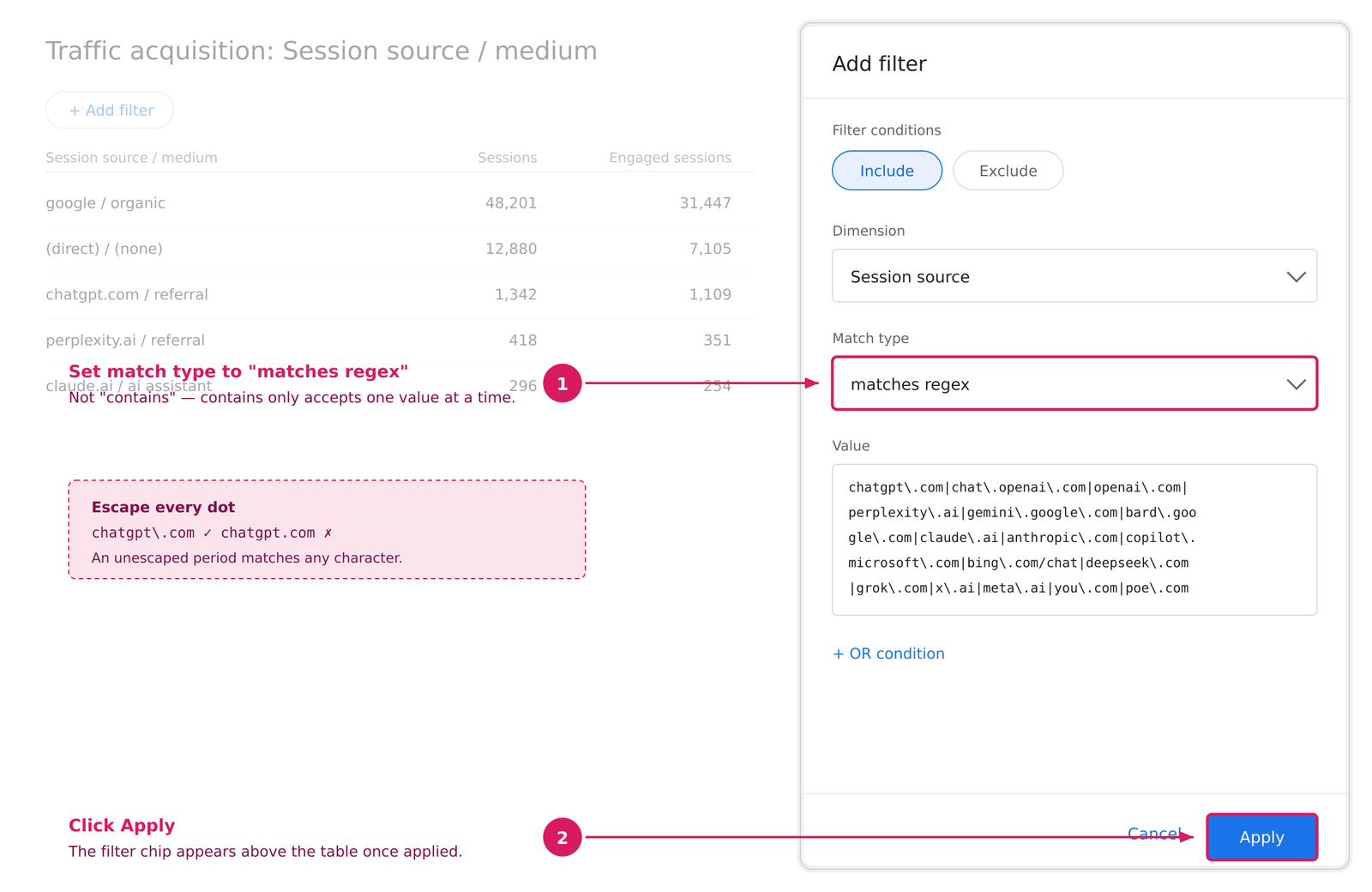
Click Add filter at the top of the report, choose Session source as the dimension, set the match type to matches regex, and paste this:
Three things to know about this string:
- Escape the dots. In regex, an unescaped period matches any character.
chatgpt\.comis correct andchatgpt.comwill also matchchatgptXcomsimilar noise. - GA4 uses RE2 syntax, and matching is case-insensitive on these dimensions, so you don’t need character classes for capitalization.
matches regexis a partial match in GA4, so itchatgpt\.comcatches subdomains and any trailing paths without extra wildcards.
If your property already shows the native AI assistant channel, add a second filter for the session default channel group and set the filter condition to OR. That catches anything the regex misses.
Step 3: Analyze Landing Pages
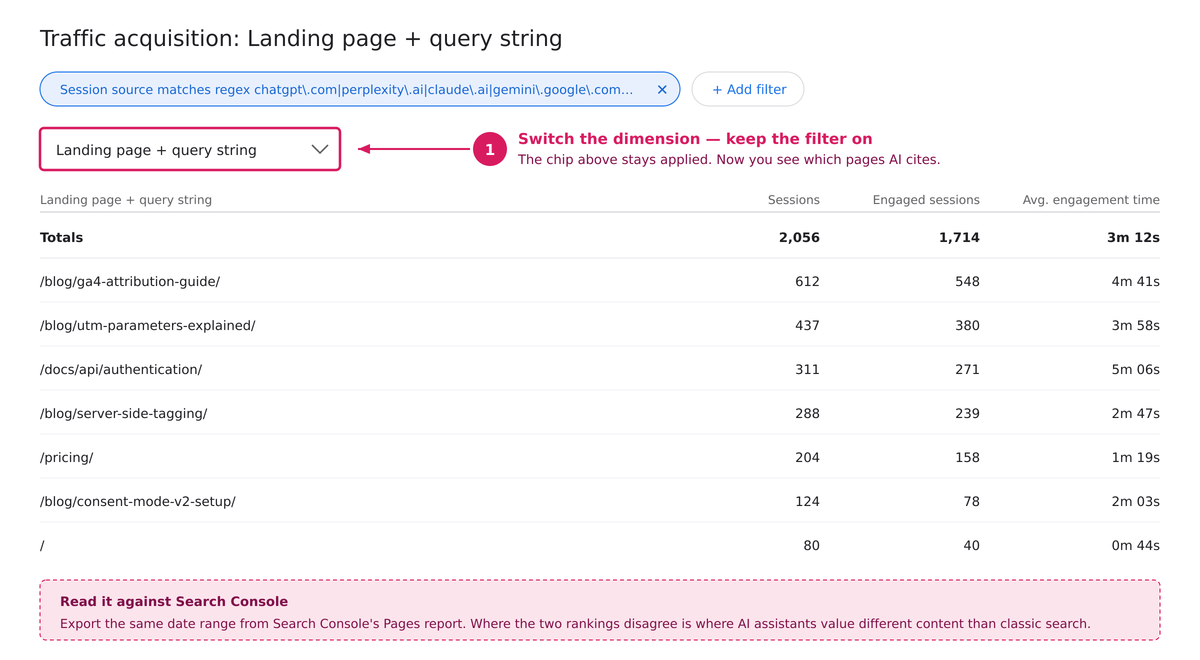
Switch the primary dimension to landing page + query string while keeping the AI source filter active. This shows exactly which pages each AI platform is citing, not just how much traffic it sends. Cross-reference this list against Search Console’s top pages. Where the two diverge is where AI assistants are valuing different content than classic search does.
Step 4: Build a Custom Exploration Report
In Explore, create a free-form exploration with session source/medium and landing page as dimensions and sessions, engaged sessions, average engagement time, and key events as metrics. Apply the same regex as a segment condition. This surfaces AI traffic quality alongside volume in one view, which is the whole argument for treating this channel seriously since the engagement numbers are where AI referrals outperform.
Step 5: Save Your AI Referral Report
Save the exploration and pin it, or export the regex-based segment as a saved comparison. This lets you track the trend weekly instead of rebuilding the filter every time.
Step 6: Build a Custom Channel Group (The Permanent Fix)
Steps 1–5 give you a view. A custom channel group makes AI a first-class channel everywhere in your reporting, including in Looker Studio dashboards that pull from GA4.
- Go to Admin > Data display > Channel groups.
- Click Create new channel group. Name it something like that.
- Click Add new channel and name it
AI Assistants. - Set the condition to Session source → matches regex → paste the Step 2 string.
- Optionally add an OR condition: Session medium → exactly matches → to inherit GA4’s native classification.
- Drag the AI Assistants channel above Organic Search and Referral. GA4 evaluates channel rules top-down and assigns each session to the first channel it matches. If AI assistants sit below Referral: Every AI session gets swallowed by Referral first, and your new channel stays empty. This is the single most common way this setup fails.
- Save.
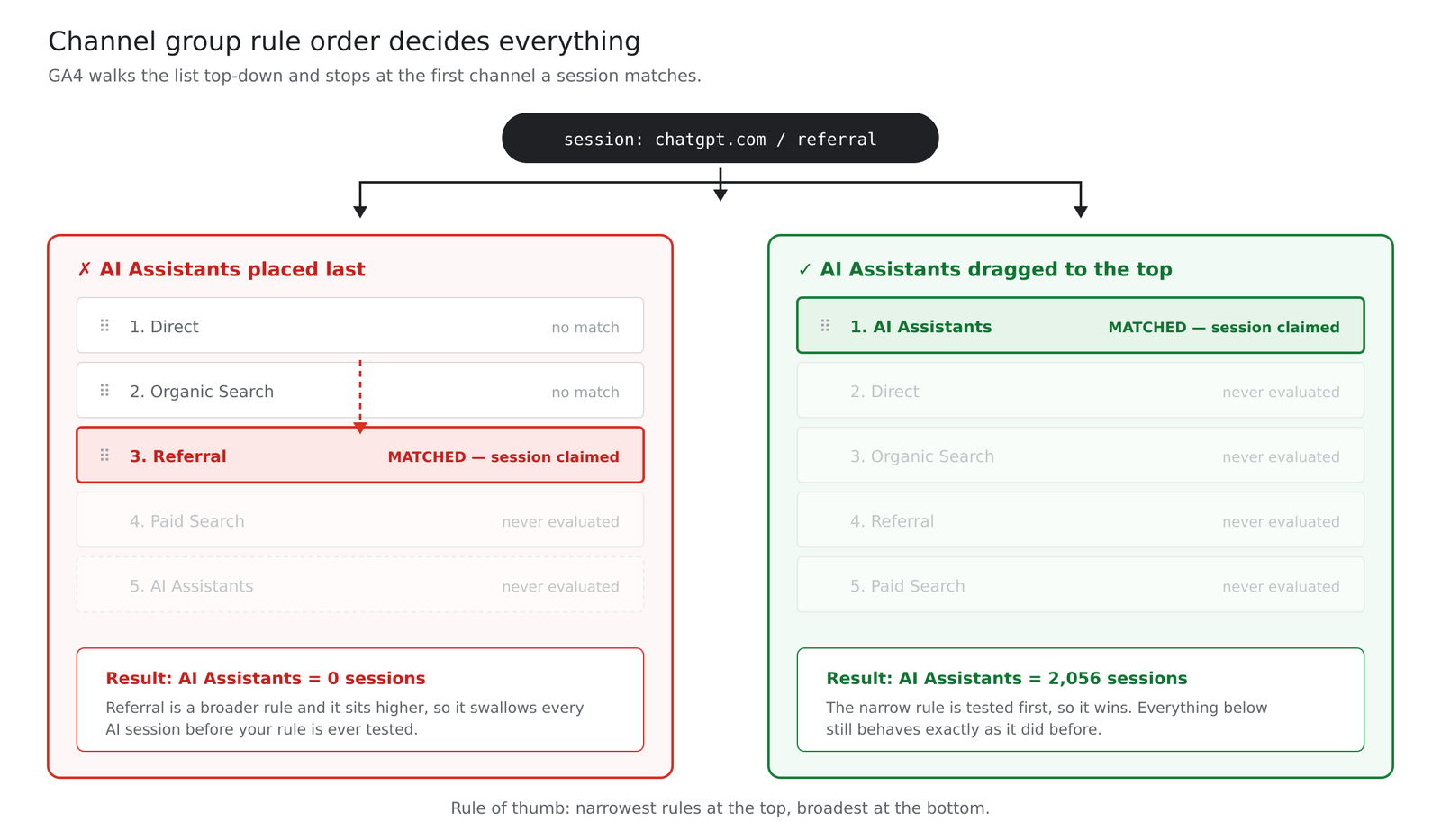
A note on history: custom channel groups in GA4 are applied at query time rather than at collection time, which means they generally populate historical data in reports and explorations rather than only counting forward. Check your own property against a known date range before you present the historical numbers to anyone.
Finally, select your new channel group as the reporting default in Admin > Data display > Reporting identity-adjacent settings, or switch it manually via the dimension picker in Traffic Acquisition.
Which AI Referral Sources Should You Monitor?
| Platform | Referral Domain | GA4 Classification |
|---|---|---|
| ChatGPT | chatgpt.com, chat.openai.com |
AI Assistant (native, May 2026+) |
| Claude | claude.ai |
AI Assistant (native, May 2026+) |
| Gemini | gemini.google.com |
AI Assistant (native, May 2026+) |
| Perplexity | perplexity.ai |
Referral (custom channel needed) |
| Microsoft Copilot | copilot.microsoft.com, bing.com/chat |
Referral (custom channel needed) |
| DeepSeek / Grok / Meta AI | deepseek.com, grok.com, meta.ai |
Referral (custom channel needed) |
Why Doesn’t GA4 Show the Complete AI Traffic Picture?
GA4’s AI traffic numbers are directionally useful but structurally incomplete, for three separate reasons.
AI Mentions Without Clicks
This is the biggest invisible layer. An AI assistant can name your brand, summarize your product, or answer a question using your content without ever generating a click. That exposure never appears in GA4 because no session was created. Citation frequency inside AI answers has to be tracked separately from referral sessions; the two measure different things entirely. See how you track citations that never produce a click? below.
Dark AI Traffic
Dark AI traffic are sessions that originated from an AI platform but arrive in GA4 as Direct because the referrer header was stripped most often from native mobile apps or copy-pasted links. Per the Goodie figures cited earlier, that’s anywhere from a third to more than 70% of AI-originated sessions landing in the Direct bucket, depending on your platform and device mix.
Missing Referral Data and Inconsistent UTMs
Attribution gaps compound across the funnel. Google’s AI Overviews and AI Mode are folded into standard organic search with no separation. Different AI platforms pass inconsistent or absent UTM parameters, so even sessions that do carry a referrer can be misclassified or grouped inconsistently across properties — chatgpt.com / referral and chatgpt.com / ai assistant will sit as separate rows unless your custom channel group unifies them.
How Do You Estimate the Traffic You Can’t See?
You can’t recover dark AI traffic, but you can bound it. The method is a comparison, not a measurement:
- Build a list of your top AI-cited landing pages from Step 3.
- In a separate exploration, filter to
(direct) / (none)sessions and set the dimension to landing page + query string. - Compare the two lists.
Direct sessions landing deep on a specific long-tail article, not your homepage, not a page anyone would bookmark or type from memory, are the signature of a stripped referrer. If a page appears in both lists, its direct sessions are a reasonable proxy for that page’s dark AI traffic.
This is directional, and it will overcount slightly (some deep direct sessions come from email, Slack, and PDFs). Track the trend rather than the absolute number, and if you have BigQuery export enabled, you can sharpen it considerably by isolating first-time direct sessions with no prior session in the dataset.
How Do You Track Citations That Never Produce a Click?
Since GA4 only sees sessions, citation tracking has to happen outside it. Three options, in order of effort:
- Manual prompt testing: Run a fixed set of 20–30 prompts covering your core topics across ChatGPT, Perplexity, Gemini, and Claude once a month. Log whether you’re cited. Crude, cheap, and surprisingly informative.
- Server log analysis: AI crawlers identify themselves in your access logs. Crawl frequency isn’t citation frequency, but a page that’s never fetched is a page that’s never cited.
- Dedicated AI visibility tools: Several vendors now poll AI assistants at scale and report share of voice. Evaluate them on prompt-set transparency; a tool that won’t show you which prompts it runs is selling you a number you can’t audit.
Separately, publishing a llms.txt file gives AI platforms a structured map of your key content. Adoption is uneven, and it is not a ranking factor, but it costs an afternoon.
Frequently Asked Questions
-
Does GA4 track AI Overviews traffic separately from organic search?
No. Google bundles AI Overviews and AI Mode clicks into standard google / organic, with no native dimension to isolate them.
-
Why does some ChatGPT traffic show up as “Direct” in GA4?
When the referrer header is stripped, common in native apps or copied links, GA4 has no source to log, so it defaults to Direct.
-
Do I need a custom channel group if GA4 already has an AI assistant channel?
Yes, for full coverage. The native channel only covers recognized platforms with intact referrers. Step 6 above walks through building one that catches everyone else.
-
Does AI referral traffic convert better than organic search traffic?
In the published data so far, yes. Similarweb’s clickstream figures put AI referral conversion at roughly 11.4% versus 5.3% for organic search. Treat this as a strong signal rather than a settled fact; the sample is early and skews toward audiences that adopted AI assistants first.
-
How much of my total traffic is likely to come from AI platforms right now?
Most sites see AI referral traffic in the low single digits of total traffic, with technology and SaaS sites on the higher end of that range.
-
My AI Assistants channel is empty after I built it. What went wrong?
Almost always rule order. GA4 assigns each session to the first channel it matches, top-down. If AI assistant sites are below referral or organic search, those channels claim the sessions first. Drag it to the top of the list.
Conclusion
AI referral traffic is no longer a rounding error, but GA4’s out-of-the-box reporting still can’t fully separate it from direct traffic or from Google’s own AI overviews. Building a custom source/medium filter, layering it on top of GA4’s native AI Assistant channel, and treating the resulting number as a floor rather than a complete count is currently the most reliable way to measure this channel.
Platform share is shifting quickly Gemini and Claude have posted some of the fastest year-over-year growth of any AI referral source in 2026, so a measurement setup built around a single platform will fall out of date fast. Put a recurring quarterly calendar reminder on the regex itself: Open the referral channel, sort by sessions, and look for any domain in the top 20 that belongs in the AI list but isn’t there yet. That’s the maintenance mechanism. “Revisit periodically” isn’t one.

Faijan waris
Hi, I'm Faijan, a passionate SEO and content strategist at RankingBite. I specialize in creating high-quality, SEO-optimized content that not only ranks on search engines but also resonates with readers. From compelling blog posts to engaging web copy, I craft every piece of content with purpose and precision. My goal is simple: to help brands tell their story, connect with their audience, and grow their digital presence through the power of words.