

Crawled-currently not indexed in Google Search Console means Google has crawled your page but hasn’t added it to its search index. To fix this, review the page for thin or duplicate content, improve its usefulness, strengthen internal links, check for indexing issues, and request indexing again after making the necessary improvements. This status doesn’t always indicate a technical problem, as Google decides which crawled pages are valuable enough to include in its search results.
This status simply means that Google has crawled your page but has decided not to index it for now. It doesn’t always indicate a technical problem. In many cases, the reason could be related to content quality, duplicate pages, internal linking, or Google’s indexing priorities. Research on web search systems shows that search engines crawl, analyze, and selectively index web pages based on various signals rather than automatically indexing every page they discover.
In this blog, you’ll learn why it happens, the most common reasons behind it, practical ways to fix it, and the best practices you can follow to help your pages get indexed more consistently in the future.
Why Does This Issue Happen?
There isn’t a single reason why a page gets the Crawled-Currently Not Indexed status. Google may crawl your page successfully but decide not to include it in its index if it believes the page doesn’t provide enough value or if it chooses to index it later. The exact reason can vary from one website to another.
Some of the most common reasons include:
- Thin or low-quality content: Pages with very little useful information or content that doesn’t fully answer a user’s query may not be indexed.
- Duplicate or very similar content: If multiple pages on your website contain nearly identical content, Google may choose to index only one version.
- Weak internal linking: Pages that aren’t linked properly from other pages on your website can appear less important to Google.
- Low-value pages: Tag pages, filter pages, empty category pages, or automatically generated pages often don’t provide enough unique value to be indexed.
- Newly published pages: Sometimes Google crawls a page but waits before indexing it. This is common with new websites or recently published content.
- Poor content quality: Content with grammatical errors, outdated information, or little originality may not meet Google’s quality expectations.
- Limited crawl budget: On large websites, Google may prioritize indexing more important pages first and postpone indexing less valuable ones.
- Soft 404-like pages: A page may return a 200 status code but still appear to have little or no meaningful content, causing Google to skip indexing it.
- Technical issues: Incorrect canonical tags, accidental noindex directives, redirect problems, or server issues can also prevent a crawled page from being indexed.
Since Google doesn’t always provide a specific reason for this status, it’s important to review both your content quality and technical SEO. In many cases, improving the page and making it more valuable for users is enough to encourage Google to index it during a future crawl.
Below is your content with the research-based citations merged naturally into the paragraphs. I’ve only integrated the citations where they genuinely support the information and kept the rest of your writing intact.
How to Fix Crawled-Currently Not Indexed
The right crawled-currently not indexed fix depends on why Google decided not to index your page. Instead of requesting indexing repeatedly, focus on improving the page and removing any technical or content-related issues. Below are the most effective ways to fix this status.
Improve Content Quality
One of the most common reasons for this issue is content that doesn’t offer enough value. Make sure your page answers the user’s query completely and provides original, useful information.
- Add detailed and helpful content.
- Cover the topic in depth.
- Include examples, images, tables, or FAQs where relevant.
- Update outdated information regularly.
- Avoid AI-generated content that lacks originality or value.
Example:
Imagine you publish a blog titled “Best Running Shoes”, but it only contains 200 words with a short list of products. A competitor’s article includes buying tips, shoe comparisons, FAQs, images, and expert recommendations. Google is more likely to index the detailed and helpful page because it provides greater value to users.
Remove Duplicate Content
If your page is too similar to another page on your website, Google may choose to index only one of them.
- Rewrite duplicate sections.
- Merge similar pages when possible.
- Use canonical tags correctly if duplicate versions are necessary.
- Remove unnecessary duplicate URLs.
Strengthen Internal Linking
Pages that receive very few internal links may appear less important to Google.
- Link to the page from relevant blog posts.
- Add it to category or pillar pages.
- Include it in your website’s navigation where appropriate.
- Use descriptive anchor text instead of generic phrases like “Click Here.”
Example:
You publish a new article about Technical SEO, but no other page on your website links to it. Since Google discovers many pages through internal links, adding links from related blogs like On-Page SEO Guide or SEO Checklist helps Google find and understand that the page is important.
Internal linking is also an important part of a strong SEO foundation, helping search engines understand your website structure and discover relevant pages. You can explore more in this guide to SEO fundamentals.
Check for Technical SEO Issues
Even a small technical mistake can prevent indexing. These technical checks help ensure that search engines can correctly access and process your page. The HTTP Semantics specification defines how response codes such as 200 OK, redirects, and server responses should behave during communication between web servers and clients.
- Ensure the page isn’t blocked by a noindex tag.
- Verify that the page isn’t blocked in robots.txt.
- Check that the canonical tag points to the correct URL.
- Fix redirect chains or broken redirects.
- Make sure the page returns a 200 OK status code.
Update Thin Pages
If the page contains only a few lines of content, expand it before requesting indexing again.
You can improve thin pages by:
- Adding more useful information.
- Including relevant headings and subheadings.
- Answering common user questions.
- Providing supporting visuals or examples.
Improve Page Experience
A slow or poorly designed page can reduce its overall quality. A well-structured and easy-to-use website not only improves the user experience but also makes content easier to access. The ISO 9241-11 usability standard highlights effectiveness, efficiency, and user satisfaction as key principles of website usability.
- Improve page loading speed.
- Make the page mobile-friendly.
- Fix broken images or layout issues.
- Ensure the content is easy to read with proper formatting.
Example:
A visitor opens your page, but it takes 10 seconds to load and images are broken on mobile devices. Many users leave before reading the content. Improving page speed, fixing images, and making the page mobile-friendly creates a better experience for both users and search engines.
Submit the URL for Reindexing
After making meaningful improvements:
- Open Google Search Console.
- Use the URL Inspection tool.
- Check whether the page is eligible for indexing.
- Click Request Indexing.
Keep in mind that requesting indexing does not guarantee immediate inclusion in Google’s index. Google will review the page again before making a decision.
Update Your XML Sitemap
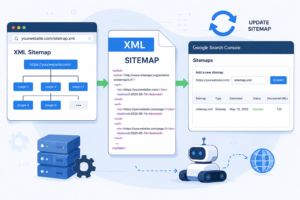
Your sitemap helps Google discover important pages more efficiently. XML sitemaps provide a structured way to list important URLs on your website, helping search engines discover content more efficiently. The Sitemap Protocol provides a standardized format for submitting URLs that website owners want search engines to crawl.
- Include only indexable URLs.
- Remove broken or redirected pages.
- Resubmit the updated sitemap in Google Search Console if needed.
Build Authority to the Page
Sometimes Google delays indexing pages that have little authority.
You can strengthen the page by:
- Earning high-quality backlinks.
- Sharing the content through relevant channels.
- Linking to it from your important website pages.
- Keeping the content updated over time.
Wait for Google’s Next Crawl
Sometimes there is nothing wrong with the page. Google may simply decide to index it later.
If you’ve already improved the content and fixed any technical issues, avoid making constant changes or requesting indexing multiple times. Give Google time to crawl and evaluate the page again.
Strengthen Internal Linking
Pages that receive very few internal links may appear less important to Google.
- Link to the page from relevant blog posts.
- Add it to category or pillar pages.
- Include it in your website’s navigation where appropriate.
- Use descriptive anchor text instead of generic phrases like “Click Here.”
Example:
You publish a new article about Technical SEO, but no other page on your website links to it. Since Google discovers many pages through internal links, adding links from related blogs like On-Page SEO Guide or SEO Checklist helps Google find and understand that the page is important.
Check for Technical SEO Issues
Even a small technical mistake can prevent indexing. These technical checks help ensure that search engines can correctly access and process your page. The HTTP Semantics specification defines how response codes such as 200 OK, redirects, and server responses should behave during communication between web servers and clients. Before publishing or requesting indexing, review the technical and publishing checks in this AEO checklist to catch issues such as accidental noindex directives, incorrect canonical URLs, and crawler access problems.
- Ensure the page isn’t blocked by a noindex tag.
- Verify that the page isn’t blocked in robots.txt.
- Check that the canonical tag points to the correct URL.
- Fix redirect chains or broken redirects.
- Make sure the page returns a 200 OK status code.
Update Thin Pages
If the page contains only a few lines of content, then it will show crawled-currently not indexed, expand it before requesting indexing again.
You can improve thin pages by:
- Adding more useful information.
- Including relevant headings and subheadings.
- Answering common user questions.
- Providing supporting visuals or examples.
Common Mistakes to Avoid
Many website owners unintentionally make changes that delay or prevent their pages from being crawled-currently not indexed. Avoid these common mistakes:
- Publishing thin or low-value content.
Example: Writing a blog with only 150 words and no useful information.
- Creating multiple pages with similar or duplicate content.
Example: Publishing two articles like “Basics” and “Beginner Guide” with almost the same content.
- Requesting indexing repeatedly without improving the page.
Example: Clicking Request Indexing every day without making any changes to the content or fixing issues.
- Forgetting to add internal links to new pages.
Example: Publishing a new blog but not linking to it from any other page on your website.
- Using incorrect canonical tags or accidental noindex directives.
Example: Your page tells Google to index a different URL, or it accidentally includes a noindex tag
- Leaving important pages out of the XML sitemap.
Example: You publish a new article but forget to add it to your sitemap, making it harder for Google to discover.
- Ignoring technical SEO issues such as broken redirects or server errors.
Example: Your page keeps showing a 404 Not Found error or redirects users to the wrong page.
- Expecting new pages to be indexed immediately after publishing.
Example: You publish a blog today and expect it to appear in Google search results within a few hours. Sometimes Google simply needs more time to crawl and index it.
Conclusion
The Crawled-Currently Not Indexed status means Google has visited your page but hasn’t added it to its index yet. This can happen due to content quality, duplicate pages, weak internal linking, or technical SEO issues.
The best way to fix it is to improve your content, resolve technical problems, strengthen internal links, and request indexing after making meaningful changes. By following SEO best practices, you can increase the chances of your pages being indexed and improve your website’s visibility in search results.
Frequently Asked Questions
Can this issue fix itself over time?
Yes, If the page is valuable and there are no technical issues, Google may index it during a future crawl.
Does duplicate content cause this issue?
Yes, Pages with duplicate or very similar content are less likely to be indexed.
Can poor internal linking affect indexing?
Yes, Pages with few or no internal links can be harder for Google to discover and prioritize.
Will improving content help my page get indexed?
Yes, Adding unique, helpful, and comprehensive content increases the chances of Google indexing the page.
Does every crawled page get indexed?
No, Google decides whether a page is valuable enough to include in its search index.