
Disavow Links and Toxic Backlinks: When to Act and When Not To

Most websites never need to disavow links. Google’s help page says its systems can judge which links to trust without extra guidance (Google Search Console Help). Google reserves the disavow tool for sites with many manipulative links that have caused, or will likely cause, a manual action. This guide shows where that line sits, how to find the backlinks that cross it, and how to use the Google disavow tool without losing rankings.
What Does It Mean to Disavow Links?
To disavow links means asking Google to ignore specific backlinks pointing to your site when it evaluates your rankings. You submit a plain-text disavow file listing URLs or whole domains through the disavow links tool in Google Search Console. Google then typically ignores the listed links.
Google launched the disavow links tool on October 16, 2012 (Google Search Central Blog). The tool arrived during the Penguin era, when bad backlinks could pull a whole site down. Its purpose has stayed narrow: it lets site owners neutralize links they cannot get removed from the web.
Four entities appear throughout this guide:
- Backlink: a link from another website to yours. Google uses backlinks as one ranking signal.
- Disavow file: a UTF-8 or 7-bit ASCII .txt file with one URL or domain entry per line.
- Manual action: a penalty a human reviewer at Google applies after finding that a site breaks Google’s spam policies (Manual actions report).
- Link spam: links created mainly to manipulate rankings, as defined in Google’s spam policies.
Disavowing does not delete a link. The link stays live on the other site and keeps appearing in your Search Console Links report. Only Google’s treatment of that link changes.
What Are Toxic Backlinks?
Toxic backlinks are links that third-party SEO tools flag as likely to hurt your rankings, based on each tool’s own scoring markers. “Toxic” is not a Google term. Google’s documentation uses “link spam” and “unnatural links” instead, and it judges links by intent, not by a vendor score.
Semrush’s Backlink Audit, for example, scores each link from 0 to 100 using more than 45 toxic markers (Semrush Knowledge Base). Ahrefs describes “toxic backlinks” as a label some SEO tools created for links they believe could hurt rankings (Ahrefs). Both tools crawl the same web, but neither tool sees how Google weighs a given link.
Google’s John Mueller has rejected the concept repeatedly. In May 2024 he wrote on Reddit that “the concept of toxic links is made up by SEO tools so that you pay them regularly” (Search Engine Roundtable). Mueller has also called disavowing tool-flagged toxic links a billable waste of time (Search Engine Roundtable).
Does Google Penalize Sites for Toxic Backlinks?
Google ignores most spammy backlinks rather than penalizing the site they point to. Algorithmic systems discount these links, so they pass no ranking value. A penalty happens only through a manual action for unnatural links, which a human reviewer applies to a pattern of manipulative links.
Three changes made ignoring spam links the default:
- Penguin 4.0 (September 2016) shifted Google from demoting sites for bad links toward devaluing the links themselves (Ahrefs; Search Engine Land).
- The December 2022 link spam update, rolled out from December 14, 2022, used SpamBrain to neutralize unnatural links. SpamBrain is Google’s AI-based spam-prevention system, and Google said it detects both sites buying links and sites built to pass outgoing links (Google Search Central Blog).
- Bing removed its disavow feature in October 2023. Bing stated that its AI separates natural from unnatural links and discounts the unnatural ones automatically (Bing Webmaster Blog).
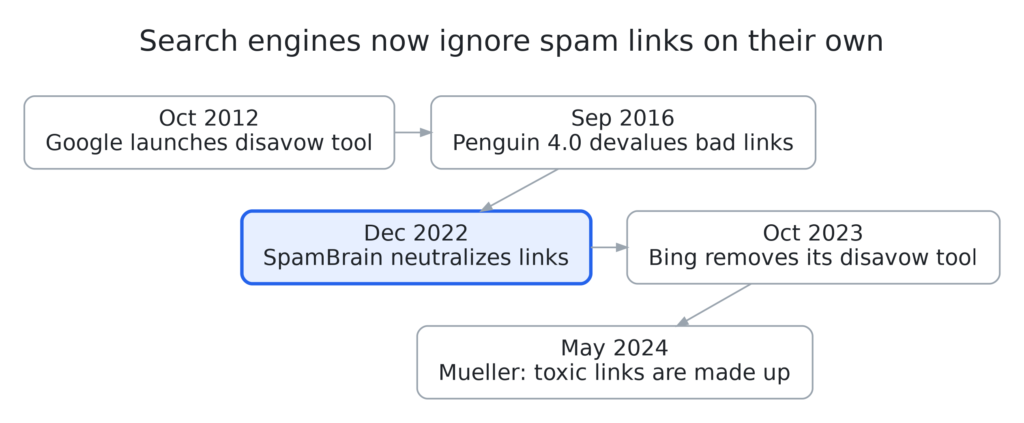
Spam links you did not build almost never need action. Links that you or a past agency paid for are a different case, because Google’s manual reviewers look for exactly that pattern. The next section turns this distinction into a decision.
When Should You Disavow Backlinks?
You should disavow backlinks only when your site has a considerable number of spammy or artificial links and those links have caused, or will likely cause, a manual action. Google’s help page requires both conditions together. One condition without the other is not a reason to disavow.
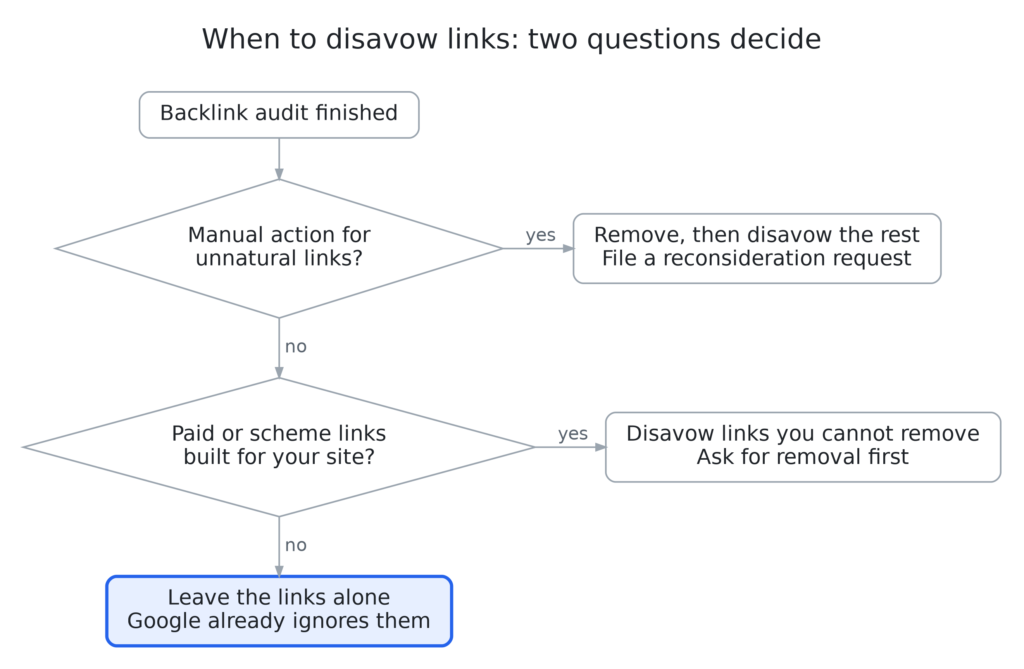
Two questions settle almost every case: does the site have a manual action, and did anyone build manipulative links for it? Every other path ends with leaving the links alone.
Which Situations Justify a Disavow?
| Scenario | Disavow? | Reason |
|---|---|---|
| Manual action for “Unnatural links to your site” | Yes | Google’s fix steps require removal outreach plus a disavow of links that stay live (Manual actions report). |
| You or an agency bought followed links that cannot be removed | Yes | Mueller advises using the tool when you paid for links and cannot get them removed (Search Engine Journal). |
| Private blog network (PBN) or guest post network links built for you | Yes | Both count as link spam under Google’s policy. |
| You bought a domain whose previous owner ran a link scheme | Yes, after an audit | Google asks new owners to fix inherited issues and mention the purchase in a reconsideration request. |
| Thousands of spam links appeared overnight, no manual action | Usually no | Google discounts automated spam; monitor the Links report. |
| An SEO tool flags links as toxic | No | A vendor score is not Google’s assessment. |
| Rankings dropped after a core update | No | Core updates reassess content quality, not link cleanup. |
| Low-authority or off-topic editorial links | No | Low quality is not manipulation. |
Paid-link history decides the two middle cases. A link you paid for stays a risk even without a current penalty, because it matches the pattern Google’s reviewers search for.
When Should You Not Disavow Links?
Do not disavow links when your site has no manual action and nobody built manipulative links for it. Google already ignores random spam, scraper copies, low-authority sites, and links that a tool calls toxic. Disavowing them adds risk without measurable benefit.
Skip the disavow tool in these six situations:
- Spammy links you did not build. Mueller has said Google already ignores links from sites like theglobe.net, where natural links are unlikely (Search Engine Land).
- A high toxicity score with no policy violation. Semrush notes that a high score alone is not a reason to disavow (Semrush).
- Low Domain Rating, foreign-language, or off-topic links. Domain Rating (DR) is Ahrefs’ 0 to 100 estimate of a site’s backlink strength, not a Google metric. Low quality differs from manipulation, so these links fall outside Google’s link spam definition unless someone created them to game rankings.
- A traffic drop after a core update. Core updates reassess content quality. Mueller has said that disavowing links flagged in a tool report will not bring rankings back (Search Engine Roundtable).
- A suspected negative SEO attack with no manual action. Google’s help page states that Google works hard to stop third-party actions from hurting a site. Monitor the links and act only when a manual action appears.
- Routine monthly “hygiene”. Mueller has described disavowing as something sites should not need to do regularly (Semrush).
What Happens When You Disavow Links You Did Not Need To?
Unneeded disavows produce little gain and can cut traffic when the file removes links that were helping you. Google warns on its help page that incorrect use can harm search performance. A disavowed helpful link stops passing value, exactly like a disavowed spam link.
Ahrefs tested this in 2024. Joshua Hardwick exported every “toxic” and “potentially toxic” link pointing to three Ahrefs blog posts from a well-known SEO tool. He disavowed all 129 URLs on July 26, 2024 (Ahrefs).
| Page | Organic visits, 20 days before | Organic visits, 20 days after | Change |
|---|---|---|---|
| SEO pricing guide | 574 | 505 | −12% |
| Top YouTube searches | 291 | 267 | −8.25% |
| Top Bing searches | 156 | 176 | +12.82% |
| All three pages (Google Search Console) | −7.1% |

Ahrefs concluded that blindly disavowing tool-flagged links had little to no positive effect and likely hurt one page. In an earlier 2021 Ahrefs test, disavowing all links to the same three posts made traffic collapse (Ahrefs). The 2024 test covers 3 pages over 20 days, so it is a warning signal rather than proof.
Does the Google Disavow Tool Work for Domain Properties?
No. The disavow links tool supports only URL-prefix properties in Search Console, not domain properties (Google Search Console Help). A URL-prefix property covers one exact protocol and host, such as https://www.example.com/. A domain property covers every protocol and subdomain under one DNS verification. Sites verified only as a domain property must add a URL-prefix property before uploading a disavow file.
How Do You Find Toxic Backlinks?
To find toxic backlinks, export your links from Google Search Console, add a third-party backlink tool’s data, group the links by domain, and review each domain against Google’s link spam policy. Flag only links that someone created to manipulate rankings, not links that only look low quality.
- Check the manual actions report first. Open Search Console, then Security & Manual Actions, then Manual Actions. A “No issues detected” message means no reviewer has penalized your site.
- Export Google’s link data. In the Links report, export the top linking sites (grouped by host) and the latest links (chronological). Google’s own fix steps for unnatural links start with these two exports (Manual actions report).
- Add a third-party index. Export referring domains from Ahrefs, Semrush, or Moz. Each crawler finds links that the others miss.
- Deduplicate by domain. Merge the lists in a spreadsheet and keep one row per referring domain. Most disavow decisions happen at the domain level.
- Prioritize the review. Google advises starting with the sites that link to you most and links created in the last few months.
- Score each domain against the policy, not a metric. Use the table below, and record why each domain was flagged. A reconsideration request needs that record.
Which Backlink Patterns Violate Google’s Policy?
Seven backlink patterns from Google’s link spam policy make a link a real disavow candidate, provided you or someone working for you built it.
| Pattern | What it looks like in an audit | Typical action |
|---|---|---|
| Paid links | Money, products, or services exchanged for a followed link | Ask for removal or rel="sponsored"; disavow if refused |
| Advertorials and guest posts with optimized anchors | Exact-match anchors in sponsored articles or press releases | Ask for nofollow; disavow the domain if ignored |
| Excessive link exchanges | Partner pages that exist only to cross-link | Remove your side; disavow the partner domain |
| Automated links | Thousands of profile, comment, or forum links created by software | Disavow by domain |
| Low-quality directories and bookmark sites | Mass-submission directories with no editorial review | Disavow by domain |
| Widget and footer links | Keyword-rich links in templates across many unrelated sites | Ask the widget owner to change it; disavow by domain |
| Forum signature links | Optimized anchors in post signatures | Disavow by domain |
Which Links Look Toxic but Need No Action?
SEO tools flag these five link types most often, yet Google already discounts them:
- Scraper and auto-generated sites that copy your content with links intact
- Low-authority blogs that link to you editorially
- Foreign-language or off-topic sites that you did not pay
- Directory and “site value” pages that list every domain on the web
- Old nofollow, ugc, or sponsored links, which pass no ranking credit
An audit that ends with zero links to disavow is a normal, healthy result.
How Do You Disavow Backlinks with the Google Disavow Tool?
To disavow backlinks, try to remove the bad links first, list the remaining URLs or domains in a .txt file, and upload that file in the Google disavow tool for the correct URL-prefix property. Google applies the list over a few weeks as it recrawls the linking pages.
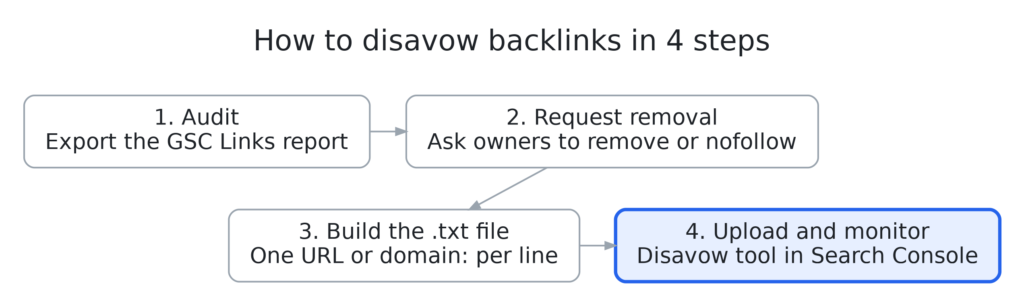
- Confirm the disavow is necessary. Use the decision flowchart above. Stop here when the site has no manual action and no paid-link history.
- Request removal first. Contact each site owner and ask for removal or a rel=”nofollow” or rel=”sponsored” attribute. Google treats removal as the preferred fix and expects a good-faith effort (Manual actions report).
- Build the disavow file. Open a plain-text editor and add one entry per line, using the format rules below.
- Open the tool. Go to the disavow links tool page. The tool does not appear in Search Console’s menu, so use the direct URL.
- Select the property. Pick the exact URL-prefix property, for example https://www.example.com/. Only a verified property owner can upload a list.
- Upload the file. Errors appear immediately, and your old list stays active until you fix them. A successful upload replaces any earlier list for that property.
- Keep a master copy. Save every version with a date in the file name. Every future change requires uploading one complete file again.
- Monitor results. Disavowed links still appear in the Links report. Watch rankings and, for penalties, the Manual actions report.
What Is the Correct Disavow File Format?
A valid disavow file is a UTF-8 or 7-bit ASCII .txt file with one URL or one domain: entry per line. Google ignores lines starting with #, so use them for comments. Every limit below comes from Google’s help page.
| Rule | Requirement |
|---|---|
| File type | .txt, encoded in UTF-8 or 7-bit ASCII |
| Entries | One URL or domain per line |
| Domain syntax | domain:example.com (also works for subdomains) |
| Subfolders | Not supported; example.com/en/ cannot be disavowed as a path |
| Maximum URL length | 2,048 characters |
| Maximum file size | 100,000 lines (blank and comment lines included) and 2 MB |
| Comments | Lines starting with # |
| Lists per property | One; a new upload replaces the old list |
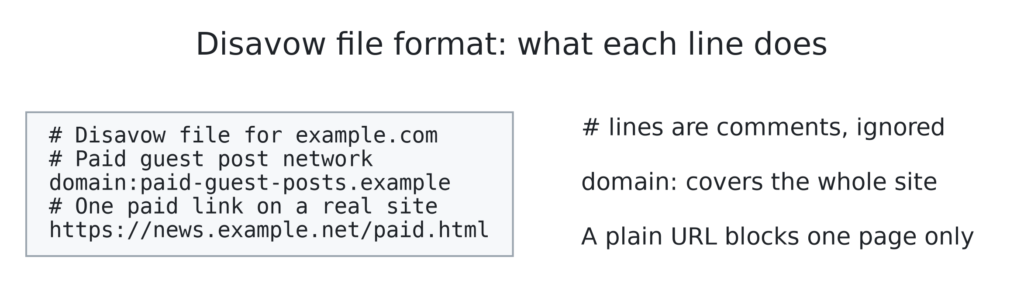
Example file:
# Disavow file for example.com, updated 2026-10-28
# Paid guest post network; removal requested 2026-09-02, no reply
domain:paid-guest-posts.example
# Single paid link on an otherwise legitimate site
https://news.example.net/2023/sponsored-roundup.html
Should You Disavow a Domain or a Single URL?
Disavow the whole domain when the site is manipulative or links to you from many pages. A domain: entry also covers pages Google has not crawled yet. Disavow a single URL only when one paid or spammy link sits on an otherwise legitimate site, such as a sponsored post on a real news site. Google recommends the domain: operator for multiple links from one domain.
Which Properties Does a Disavow List Cover?
A disavow list applies only to the property you upload it to, plus its child properties. Upload separate lists for http:// and https:// properties. A list on example.com also covers m.example.com, and Google combines the two lists when both properties have one (Google Search Console Help).
Can You Undo or Update a Disavow File?
Yes. A disavow can be updated or fully cancelled at any time. To update it, upload a new complete file, which replaces the old one. To cancel, open the tool, select the property, and click Cancel Disavowals. Google needs a few weeks to reprocess either change (Google Search Console Help).
What Should You Do After a Manual Action for Unnatural Links?
After an “Unnatural links to your site” manual action, remove every manipulative link you can, disavow the rest, then file a reconsideration request that documents both. Disavowing alone does not lift the penalty. A Google reviewer must confirm the fix and revoke the action.
Google’s Manual actions report lists four expectations (Manual actions report):
- Removal before disavowal. Blindly adding all backlinks to a disavow file does not count as a good-faith effort and is not enough for a successful request.
- No organic links in the file. Google tells site owners not to disavow natural links.
- The domain: operator for multiple links from one domain.
- Documentation. Include the links you had removed and explain the ones you could not remove.
What Should a Reconsideration Request Include?
A reconsideration request should explain the exact issue, describe the steps taken to fix it, and document the outcome, according to Google’s Manual actions report. For link penalties, that means naming the link scheme, showing outreach records, and listing removed versus disavowed links.
A practical structure has four parts:
- The cause. For example: “A former agency bought 340 guest post links between 2021 and 2023.” This figure is illustrative; use your own audit numbers.
- The removal effort. Number of sites contacted, dates, and a shared spreadsheet of replies.
- The result. Links removed, links changed to nofollow or sponsored, and links disavowed.
- The prevention plan. New link acquisition rules, such as no paid followed links.
How Long Does a Disavow Take to Work?
Google says a successful upload can take a few weeks to take effect, because Google applies the list as it recrawls and reprocesses the linking pages (Google Search Console Help). Reconsideration reviews take several days or weeks, and link-related requests can take longer (Manual actions report).
Google sends no confirmation when it has processed a disavow file. Recovery after a penalty is also not a return to old rankings. Links that once inflated rankings stop counting, so the site settles at the level its clean link profile supports.
Can You Still Disavow Links in Bing?
No. Bing removed the disavow links feature and its API from Bing Webmaster Tools in October 2023 (Bing Webmaster Blog). Bing said its AI detects and discounts unnatural links automatically. The Bing backlink report remains available for monitoring, and Bing still warns that link schemes and link buying can get a site delisted.
Guides that still show Bing disavow steps are out of date. For Bing, the only fix for paid links is removal or a nofollow or sponsored attribute.
What Are the Most Common Disavow Mistakes?
The most damaging disavow mistakes remove good links or leave the real problem untouched. Each of the seven mistakes below comes from a documented Google warning or a tested outcome.
- Uploading a tool’s toxic list unreviewed. The Ahrefs test above shows this tends to do nothing or cut traffic.
- Uploading a partial file. Each upload replaces the old list, so a file with only new entries silently re-enables every earlier disavow.
- Disavowing the Search Console export as-is. Google warns site owners to delete URLs they do not want disavowed from the export first.
- Using the wrong property. A list on the http:// property does not cover https://.
- Expecting a disavow to lift a manual action. Only a reviewed reconsideration request lifts it.
- Skipping removal outreach. Google can reject reconsideration requests that only disavow.
- Trying to disavow a subfolder. The file format does not support paths such as example.com/blog/.
Frequently Asked Questions
Does Disavowing Links Improve Rankings?
Disavowing links rarely improves rankings on its own. A disavow helps when it supports lifting a manual action or removes the penalty risk from paid links. Sites without either problem have nothing to recover, because Google already ignores spam links.
Can Toxic Backlinks Hurt Your Site?
Spam links you did not build almost never hurt a site, because Google’s systems discount them. Links you paid for or built through link schemes can trigger an “Unnatural links to your site” manual action, which does reduce visibility.
How Often Should You Update a Disavow File?
Update a disavow file only when you find new manipulative links tied to your site or need to remove entries. Most sites do not need a monthly routine. Each update must include the complete list, because every upload replaces the previous one.
Is Google Removing the Disavow Tool?
The disavow tool is still live. In May 2024, Mueller said Google would remove the tool at some point (Search Engine Roundtable), but Google has announced no date. Bing already removed its version in October 2023.
What Is the Difference Between Removing and Disavowing a Link?
Removing deletes the link from the web; disavowing leaves it live but asks Google to ignore it. Google prefers removal or a nofollow or sponsored attribute. The disavow tool covers links whose owners do not respond.
Should You Disavow Links After Buying a Domain?
Audit a domain’s backlinks before or right after purchase. Disavow only when the previous owner built paid or scheme links, or when the domain has a manual action. Google advises new owners with a manual action to fix the issue and state in the reconsideration request that they recently acquired the site.
Can a Competitor’s Negative SEO Attack Get Your Site Penalized?
Negative SEO rarely leads to a penalty, because Google discounts spam links automatically and states that it works to stop third-party actions from harming sites. Keep monitoring the Links report. Disavow attack domains only when a manual action appears or the links copy a paid-link pattern at scale.