GA4 direct traffic is a catch-all label for any session with no referrer data, not proof that a user typed your URL or used a bookmark. A measurable share of GA4 direct traffic started as an organic search click and lost its referrer somewhere between the search results page and your server. This guide covers the four specific causes, how to prove it’s happening on your own property, how to fix what’s fixable, and how to estimate the portion that isn’t.
The table below maps each cause to the symptom an analyst is most likely to notice first, before digging into the mechanism behind it.
| Symptom You Notice | Likely Cause |
|---|---|
| Direct sessions are concentrated on mobile and spike after a social share. | In-app browser clicks are stripping referral information. |
| Direct landing pages match your top organic content instead of your homepage. | HTTPS → HTTP hop or a redirect chain is causing referrer loss. |
| Direct traffic increases after adding a link shortener or tracking redirect. | The redirect chain is dropping the referrer before users reach your site. |
| Google Search Console clicks consistently exceed GA4 organic sessions by a stable percentage. | A structural referrer loss issue rather than normal measurement noise. |
Why This Misattribution Happens
Four distinct mechanisms strip referrer data from an organic search click before it reaches GA4: browser referrer policies, HTTPS to HTTP protocol downgrades, in-app browser behavior, and redirect chains that drop the header along the way. Each one produces the same symptom (a session lands in Direct) through a different technical path.
Referrer stripping by browsers and apps
Modern browsers default to a strict-origin-when-cross-origin referrer policy, sending only the origin domain (not the full search results URL) on a cross-origin navigation. This alone does not cause a direct classification, since GA4 still receives it google.com as the referrer domain and correctly buckets the session as organic search. The classification breaks when the referrer is dropped entirely rather than trimmed, which happens under the next three causes.
HTTPS to HTTP hops that drop the referrer
Browsers refuse to send referrer data when a page navigates from an HTTPS origin to an HTTP origin, regardless of the referrer policy configured on either page. This is a hardcoded security behavior, not a setting. If any hop between the search results page and your final landing page serves content over plain HTTP, the referrer header is dropped at that hop and the session arrives at GA4 with nothing to classify it by.
As a worked example, a user clicks an organic result pointing to an HTTPS page; that page contains an old HTTP redirect left over from a domain migration, and the redirect forwards the user to your current HTTPS site. The referrer is dropped at the HTTP hop in the middle of that chain, even though both the origin and the destination are HTTPS. GA4 records this session as Direct despite the journey starting and ending on secure pages.
 In-app browser clicks from social and email apps
In-app browsers built into apps like Instagram, TikTok, and several email clients render pages inside a custom webview rather than the device’s default browser. Some of these webviews omit the referrer header entirely or replace it with the app’s own domain, independent of how the user originally reached the shared link. A search result shared into a chat and opened inside that app’s in-app browser can lose its organic origin entirely before GA4 ever sees the session.
Redirects that lose the referrer along the chain
A JavaScript-based redirect does not preserve the incoming referrer header the way a server-side 301 or 302 redirect does. URL shorteners, tracking redirects, and AMP cache handoffs frequently rely on one of these methods. Each additional hop in a redirect chain is a point where the referrer can be dropped, and a single JavaScript hop anywhere in the chain is enough to erase it for the rest of the journey.
Consider a query result linking to a shortened URL used in a distribution partner’s feed. That shortener issues a server-side 301 to an AMP cache URL, which then uses a JavaScript redirect to load your canonical page. The first hop preserves the referrer. The second hop, being JavaScript-based, does not. GA4 records the session as Direct even though two of the three hops behaved correctly.
How to Diagnose Whether This Is Actually Happening to You
Three checks confirm real misattribution rather than a coincidental direct traffic pattern: comparing Search Console clicks against GA4 organic sessions, examining whether direct landing pages behave like organic entries, and correlating direct spikes with mobile or in-app referral activity. Run all three before making any change, since a single check can produce a false positive.
Compare Search Console clicks against GA4 organic sessions
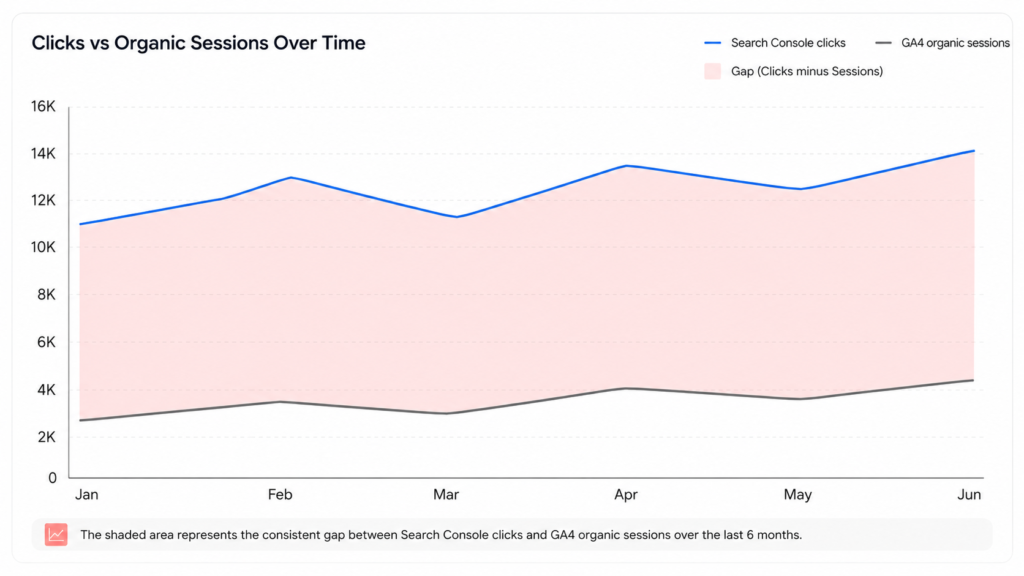
Pull Search Console clicks and GA4 organic sessions for the same query set and date range, then calculate the gap between them as a percentage. A gap that stays consistent across multiple months, rather than fluctuating randomly, points to a structural cause like the ones above rather than normal measurement noise between two different tools.
Check whether “Direct” landing pages behave like organic entries
Pull your top direct landing pages and compare them against your top organic landing pages and ranking queries. Genuine typed-URL and bookmark traffic concentrates heavily on a homepage or a small number of well-known brand pages. A direct landing page list dominated by deep content pages that also rank well organically is a strong signal that a share of that direct traffic started as a search click.
For example, a property where the top five Direct landing pages are the homepage, the pricing page, and three brand-related pages is showing a pattern consistent with genuine Direct traffic. A property where the top five direct landing pages are individual blog posts ranking for long-tail queries, with almost no direct sessions on the homepage, is showing a pattern inconsistent with typed-URL behavior and consistent with misattributed search.
Look for Direct spikes that correlate with mobile or in-app referral sources
Segment direct sessions by device category and cross-reference spikes against known content distribution activity, such as a piece being shared widely on social platforms with in-app browsers. A direct spike concentrated on mobile devices, timed to a content push through channels known to use in-app webviews, is consistent with referrer stripping rather than a genuine increase in typed-URL visits.
Verify the referrer header directly using browser developer tools
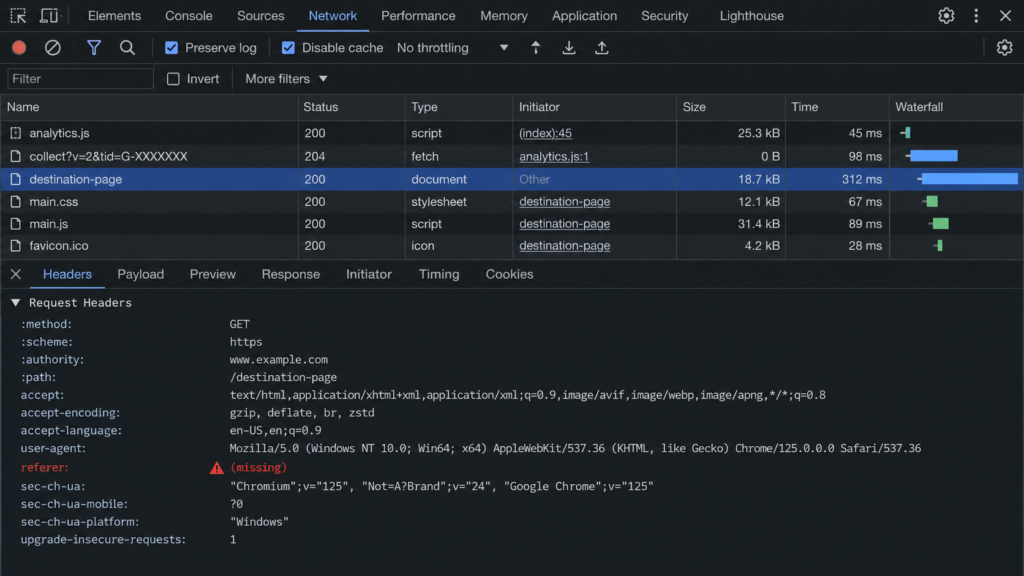
Open the Network tab in Chrome DevTools, click a link to your site from an actual search result, and inspect the request headers on the resulting navigation for a Referer value. An absent header on a request that should have carried one confirms the mechanism directly, rather than inferring it from aggregate GA4 and Search Console numbers alone. Repeat this test from a mobile device using the in-app browser of the platform you suspect, since desktop Chrome behavior does not reflect what an in-app webview does.
How to Correct the Misattribution
Four fixes address the causes above, in order from most controllable to least: eliminating HTTP hops you own, setting an explicit referrer policy, auditing your own redirect chains, and adding custom GA4 channel rules to recapture recognizable patterns. Each fix targets a specific mechanism rather than treating direct traffic as one undifferentiated problem.
Fix mixed-content links and HTTP hops on your own property
Audit internal links, embedded resources, and any redirect endpoints you control for plain HTTP URLs, and update them to HTTPS. This fix only works when the HTTP hop is on your own infrastructure. An external site linking to you over an HTTP page is outside your control and belongs in the estimation approach below, not this fix.
A common source of this issue is an old sitewide redirect rule, written years ago during an HTTP to HTTPS migration, that still forwards a specific legacy URL pattern through an HTTP intermediate step before reaching the current HTTPS destination. Reviewing redirect rules older than your most recent domain migration is a reliable way to find these leftover hops.
Set an explicit referrer policy across your site
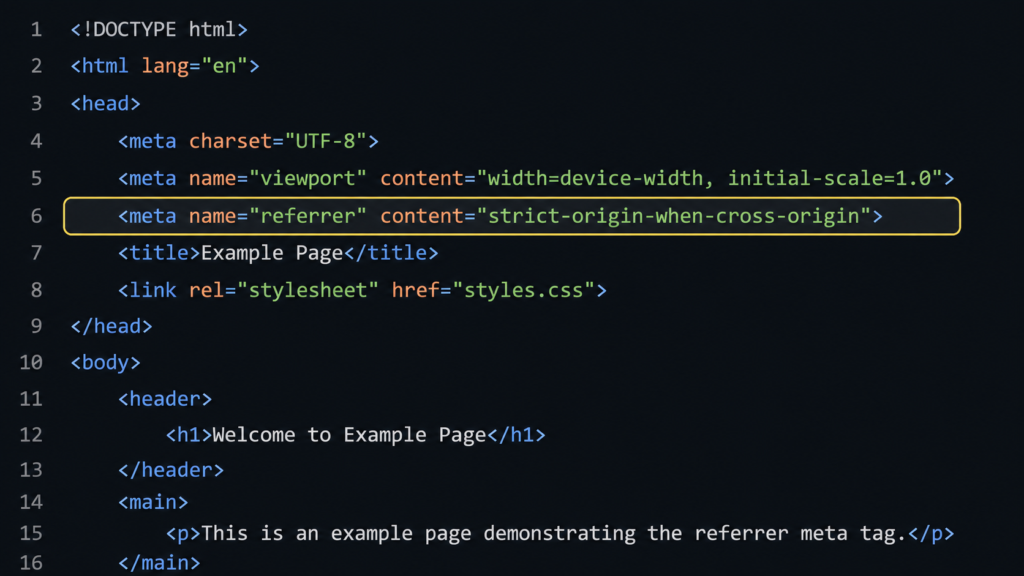
Add a Referrer-Policy header or an equivalent meta tag set consistently across every page template. This does not restore a referrer already dropped by an HTTPS to HTTP downgrade, since that behavior is enforced by the browser independent of your policy setting, but it prevents inconsistent policy values across different page types from creating additional, avoidable referrer loss.
Implement this as an HTTP response header rather than a meta tag where possible, since the header applies before the page begins rendering. If you cannot control server headers, the equivalent meta tag is placed in the page<meta name="referrer" content="strict-origin-when-cross-origin">. Audit both your primary templates and any secondary properties, such as a separate blog subdomain, since a policy set correctly on one property and missed on another produces inconsistent referrer behavior across your own domains.
Audit redirect chains for hops that drop the header
Map every redirect chain your property participates in, including link shorteners, tracking redirects, and AMP cache handoffs, and confirm each hop uses a server-side 301 or 302 rather than a JavaScript-based redirect. Replace any meta-refresh or window.location redirect in a chain you control with a server-side equivalent, since this is the fix most likely to recover a meaningful share of misattributed sessions.
Add custom GA4 channel rules to recapture known patterns
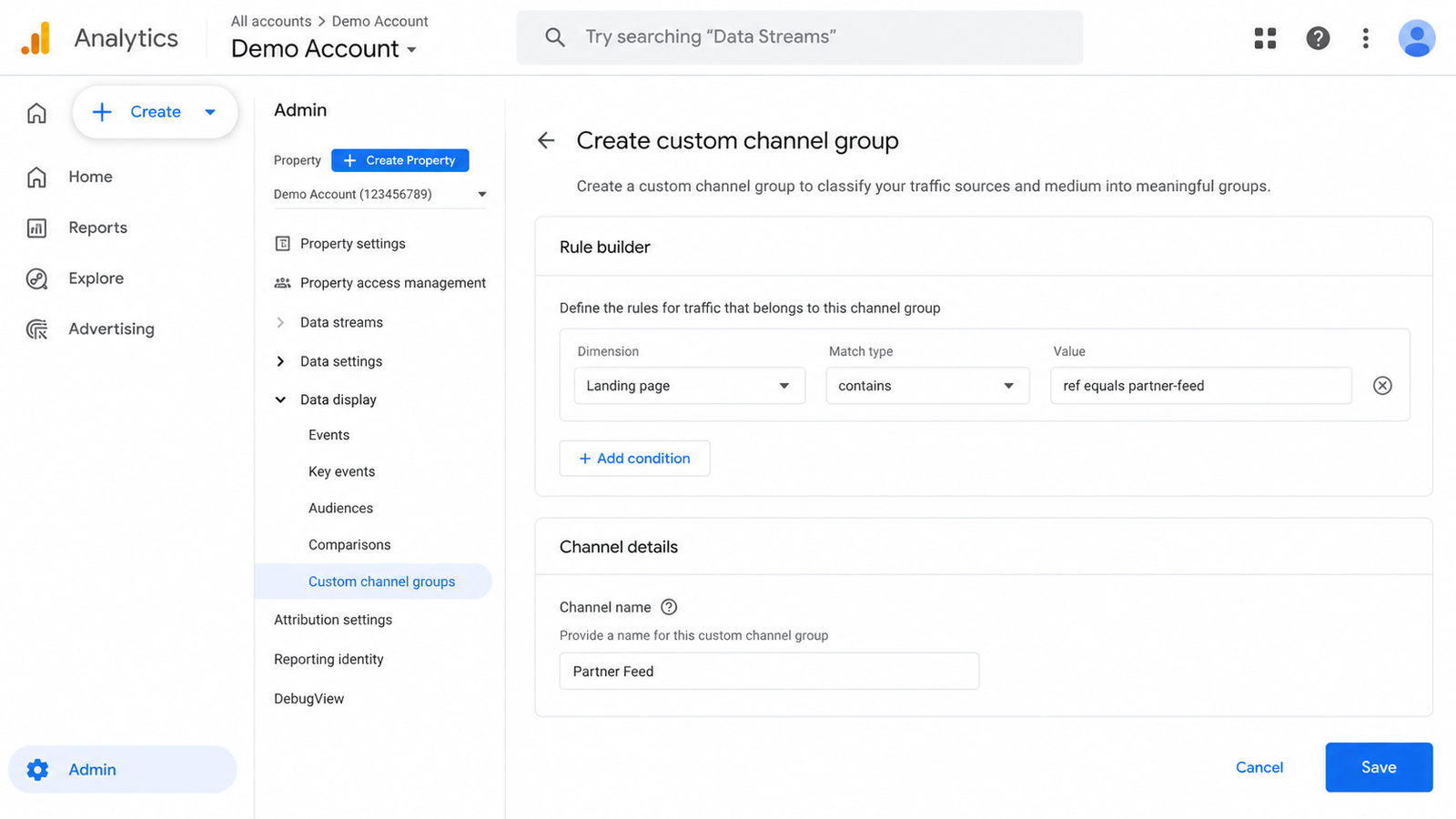
Build regex-based custom channel rules in GA4 targeting identifiable in-app user agents or landing page patterns unique to a known direct-generating source. This will not recover every misattributed session, but it correctly reclassifies the subset with an identifiable, consistent pattern rather than leaving all of it labeled Direct.
A practical starting rule targets sessions where the landing page matches a specific query parameter your content distribution tool appends automatically, even when the referrer itself is missing. For example, a channel rule matching “Landing page contains ?ref=partner-feed” and reclassifying those sessions into a labeled channel separates a known, identifiable source from the general Direct bucket, even though the underlying referrer header never reached GA4.
How to Estimate the Misattribution When You Can’t Fully Fix It
Some referrer loss is structurally unfixable, since it depends on browser behavior and third-party in-app webviews outside your control, which makes estimating the size of the gap more useful than chasing a perfect correction. Two modeling approaches and a defined error range replace false precision with a defensible number.
A proxy-metric modeling approach using Search Console impressions
Combine Search Console impressions and click-through rate with your known on-site conversion rate to model an expected organic session count, then compare that model against your actual recorded organic sessions plus a reasonable share of Direct. The difference between the modeled expectation and the recorded organic number approximates the portion of direct traffic that is actually misattributed search.
As a worked example, if Search Console reports 50,000 impressions and a 4% click-through rate for a set of queries, the model expects roughly 2,000 organic sessions from that query set. If GA4 records only 1,700 organic sessions against those same landing pages, the remaining 300 sessions are a reasonable estimate of the misattributed share, assuming no other channel is independently driving traffic to those same pages.
Using branded search volume as a comparison baseline
Track branded query volume growth in Search Console against branded organic search session growth in GA4 over the same period. A branded query volume rising while branded organic sessions stay flat, with no corresponding rise in paid or referral branded traffic, indicates that growth is landing in direct traffic instead.
Setting a reasonable estimated-error range instead of a false-precision number
Report the misattribution as a range, such as 5 to 15 percent of total direct sessions, rather than a single exact figure. A single-number estimate implies a precision the underlying data cannot support, given that the causes above vary in size across different traffic sources and device mixes.
Conclusion: What This Actually Changes About Your Reporting
This correction does not inflate your organic traffic for its own sake. It corrects a real measurement bias built into how GA4 classifies sessions with missing referrer data. Once the fixable causes are addressed and the unfixable share is estimated with a stated range, your organic channel numbers reflect actual search-driven traffic more closely than the raw GA4 report alone. This is the same underlying measurement gap driving AI search’s compounding effect on organic reporting, covered in more depth in how AI search is compounding this same attribution gap.
For an analyst maintaining this correction long term, the practical takeaway is to treat it as a recurring audit rather than a one-time fix. Revisit the symptom-to-cause table above each quarter, re-run the developer tools check after any site migration or CDN change, and update the estimated-error range whenever a redirect chain or third-party distribution channel changes. Referrer behavior shifts when browsers update default policies or when a distribution partner changes their in-app webview implementation, so a correction that held true last year can silently drift without a recurring check.
FAQs
-
Is all direct traffic in GA4 actually misattributed organic search?
No. Some direct traffic is genuinely typed URLs or bookmarks; the point of this guide is to isolate the portion that isn’t.
-
Does fixing referrer stripping recover historical data GA4 already recorded as direct?
No. These fixes only affect future sessions going forward; past sessions stay recorded as direct.
-
Can Google Tag Manager fix referrer stripping on its own?
No. GTM can help implement a referrer policy or custom channel rules, but it cannot restore a referrer header a browser or app has already dropped.

Faijan waris
Hi, I'm Faijan, a passionate SEO and content strategist at RankingBite. I specialize in creating high-quality, SEO-optimized content that not only ranks on search engines but also resonates with readers. From compelling blog posts to engaging web copy, I craft every piece of content with purpose and precision. My goal is simple: to help brands tell their story, connect with their audience, and grow their digital presence through the power of words.