Page-intent segmentation is the practice of tagging every page on a site by the search intent it serves, informational, commercial, transactional, or branded, before analyzing traffic and conversion data. Without this layer, standard reports blend pages with completely different jobs into a single average, and that average tells you almost nothing useful. Allowing a page to exist on the site is not the same as knowing what job it is actually doing in your reports.
In this guide, you will learn the four-way classification scheme, how to tag pages at scale, how to wire the result into GA4 reporting, how to maintain the mapping over time, and which mistakes quietly break this kind of segmentation.
Key Takeaways
- Unsegmented reports blend pages with different jobs into one misleading average.
- Four categories cover almost every page: informational, commercial, transactional, and branded.
- Hybrid pages get tagged by primary function, not by every element on the page.
- Rules-based tagging handles most pages. The long tail still needs manual review.
- The mapping must live inside GA4 as a dimension, not in a separate spreadsheet.
- Re-tagging is a recurring cadence, not a one-time project.
Why Unsegmented Reporting Misleads You
Most GA4 or GSC reports treat a site as one undifferentiated pool of pages. A blog post explaining what a topic means gets averaged in with a pricing page, and the resulting metric, whether it is conversion rate, engagement time, or average session value, is a number that describes neither page well.
The Blended-Average Problem
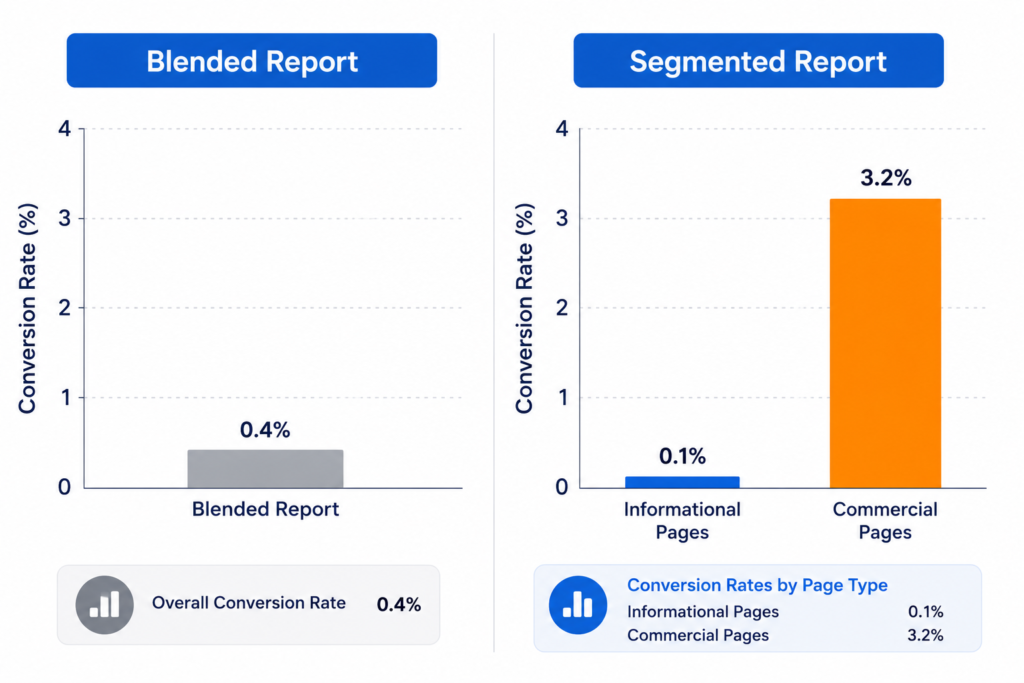
Informational pages tend to pull in high volume with low intent to buy. Transactional pages pull in low volume with high intent to buy. When you average the conversion rate across both, informational traffic drags the number down, and transactional performance gets buried inside it. The site-wide figure looks mediocre even when the transactional pages are performing exactly as they should.
A Concrete Example
Take a report showing “content pages convert at 0.4 percent.” On its own, that looks like a weak result and might prompt a team to deprioritize content. Segment the same data by intent, and a different picture appears: informational pages convert at 0.1 percent, which is expected for top-of-funnel content, while the handful of commercial-intent comparison pages inside that same bucket convert at 3.2 percent. The blended number hid a strong performer.
Two analysts looking at the same GA4 property can walk away with opposite conclusions depending on whether the data was segmented first.
Who This Breaks For
This matters most for analysts who report performance to stakeholders and for strategists deciding where to invest the content budget. If the reporting layer does not separate intent, both groups are making calls on a distorted picture, and the distortion compounds every reporting cycle it goes unfixed.
The Page-Intent Classification Scheme
A workable scheme needs four categories, each with defining traits you can check against a page in seconds.
Informational
These pages exist to teach or explain. The reader has not decided to buy anything yet; they are trying to understand a topic. Defining traits include definitional language, “what is” or “how does” framing, and no direct product comparison or purchase language. URL patterns often look like /blog/, /guide/, or /resources/.
Commercial
These pages help a reader compare options before they buy. The reader knows they want a solution and is evaluating which one. Defining traits include comparison tables, “best,” “vs,” or “top” framing, and reviews or alternatives content. URL patterns often include /vs/, /best-, or /compare/.
Transactional
These pages exist to convert. The reader is ready to act. Defining traits include pricing information, a clear call to action, and product or service specifics rather than general education. URL patterns typically look like /pricing/, /signup/, /services/, or /product/.
Branded
These pages exist because someone already knows the brand and is looking for it directly. Defining traits include company name in the query or title, “near me” style local intent tied to the brand, and low informational content. URL patterns are usually the homepage, /about/, or location pages.
Edge Cases and Hybrid Pages
Some pages genuinely serve two intents. A long-form guide with a pricing table embedded near the bottom reads as informational for most of its length but ends with a transactional nudge. In these cases, tag by the primary function the page is built to serve, not by every element it contains. If a page’s title, structure, and majority of content are built around teaching, it is informational even if it closes with a call to action. Reserve the commercial or transactional tag for pages where comparison or conversion is the actual point of the page.
How to Tag Pages at Scale
Manually reviewing every page one by one does not scale past a few dozen URLs. The following steps build a repeatable tagging process.
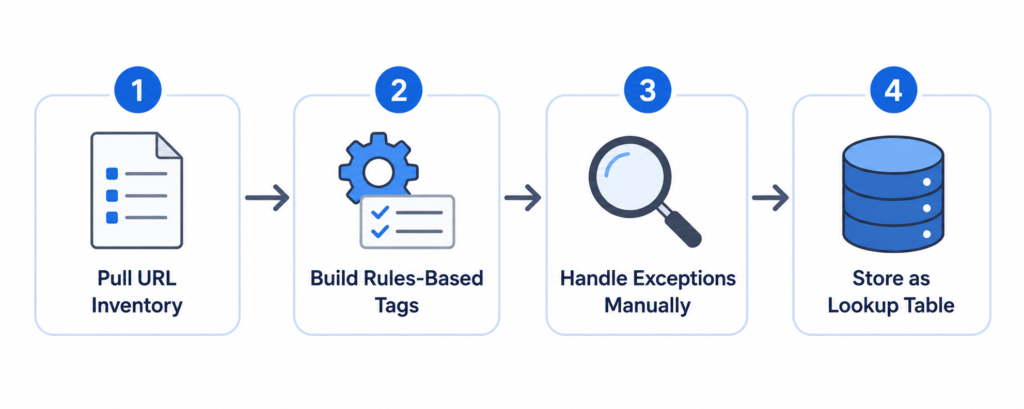
Step 1: Pull the Full URL and Page Inventory
Export the complete list of indexed pages from GA4 or Google Search Console. This is your working inventory and the base you will tag against.
Step 2: Build a Rules-Based Tagging Layer
Write tagging rules based on URL patterns, page template, and consistent on-page signals. For example, any URL containing /blog/ “defaults” to informational, and any URL containing /pricing/ or /product/ defaults to transactional. Most sites already follow some structural convention, and rules built on that convention will correctly tag the majority of pages without manual review.
Step 3: Handle Exceptions Manually
Rules will miscategorize a portion of the long tail, particularly hybrid pages or pages that do not follow the site’s usual URL conventions. Review this remaining set by hand and apply the primary-function test from the edge case section above.
Step 4: Store the Mapping as a Lookup Table
Do not treat the tagging exercise as a one-time spreadsheet. Store the URL-to-intent mapping as a persistent lookup table or dimension that can be referenced every time a report is pulled. A one-off tagging pass goes stale within a quarter as new pages publish and existing pages get restructured.
Wiring Intent Tags Into Reporting
Once pages are tagged, the classification needs to live inside the reporting tool itself, not in a separate spreadsheet that someone has to remember to cross-reference.
Adding Page-Intent as a Custom Dimension in GA4
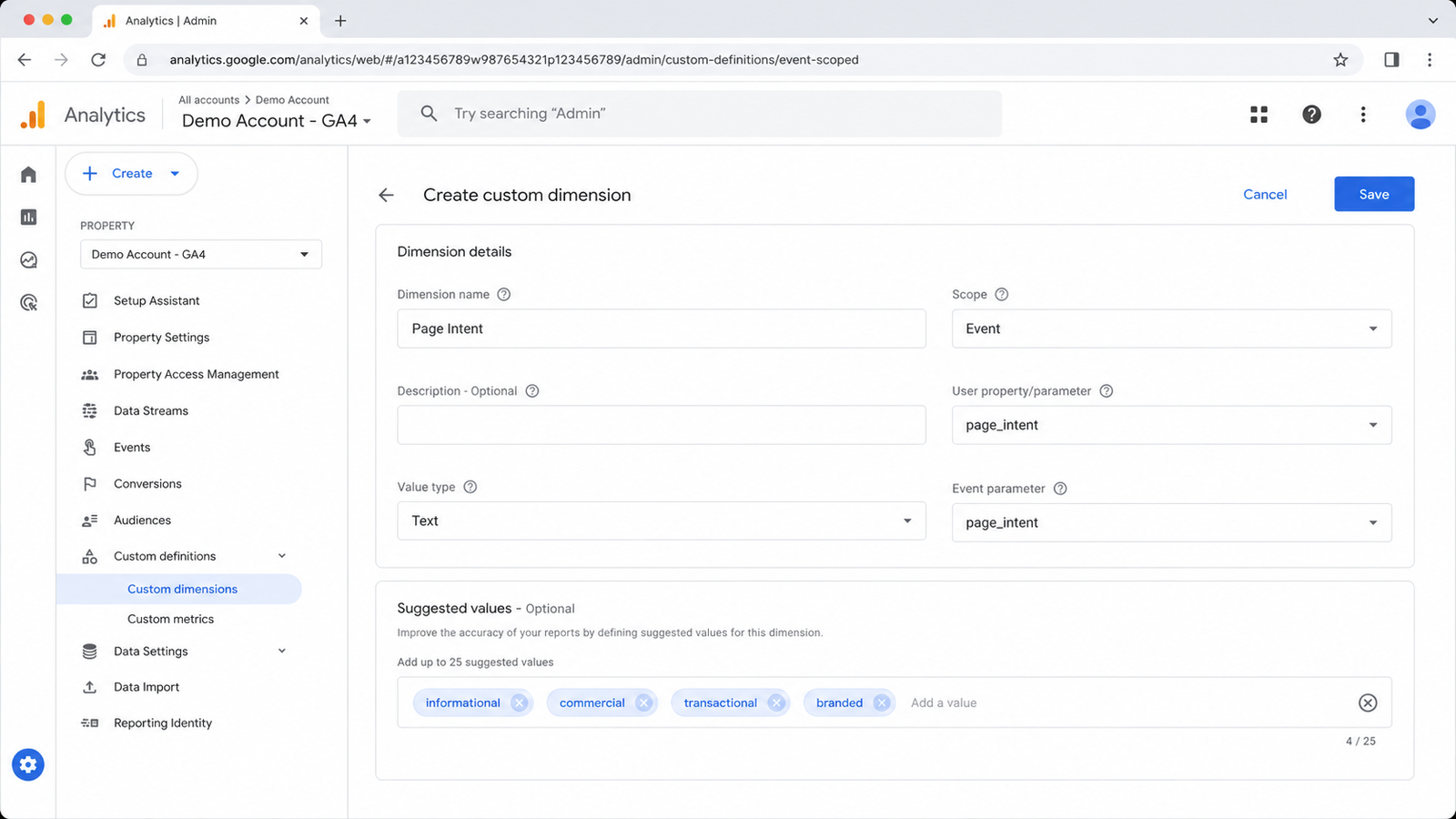
Import the URL-to-intent mapping as a custom dimension in GA4. This allows every standard report, traffic, engagement, and conversion to be filtered or broken out by intent without manual joining.
Segmenting Standard Reports by Intent
With the dimension in place, apply it as a segment or breakdown across the reports your team already reviews. Traffic by intent, conversion rate by intent, and engagement time by intent should become standard views rather than special requests.
Sample Segmented Report Layout
A useful layout places intents as rows and the core metrics, sessions, conversion rate, and average engagement time, as columns. This format makes the contrast between informational and transactional performance visible at a glance, which is exactly the contrast a blended report hides.
Maintaining the Segmentation Over Time
A tagging system that is accurate once and never revisited will quietly go wrong.
Re-Tagging Cadence
Set a recurring cadence, monthly or quarterly depending on publishing volume, to re-run the rules-based tagging against newly published pages and to spot-check pages whose intent may have drifted, for example, an informational guide that was later updated with a stronger commercial section.
Ownership
Assign clear ownership for updating the mapping whenever content is restructured, migrated, or newly published. Without a named owner, the mapping degrades the same way any unowned system does, silently and gradually.
Common Mistakes to Avoid
- Tagging by keyword alone instead of by what the page is actually built to do. Keywords hint at intent, but the page’s structure and purpose are the real signal.
- Treating branded pages as an afterthought bucket that gets ignored in analysis. Branded traffic behaves differently from the other three categories and deserves its own line in reporting.
- Letting the mapping go stale after a site migration, URL restructure, or template change, which is exactly when the existing tags become inaccurate.
Conclusion
Reporting that does not segment by page intent produces numbers that look precise but describe nothing accurately. A four-category scheme, informational, commercial, transactional, and branded, tagged through URL and template rules and maintained as a living dimension inside GA4, replaces a misleading average with a report that reflects what is actually happening on the site. Apply this before your next reporting cycle, and the same data will tell a more honest story.
Frequently Asked Questions?
-
How often should page-intent tags be reviewed?
Monthly for high-publishing-volume sites, quarterly for smaller ones. Any site migration or template change should trigger an immediate re-check regardless of the regular cadence.
-
Does page-intent segmentation replace funnel-stage tagging?
No, the two serve different purposes and work best together. “Intent” describes what the reader wants right now, while “funnel stage” describes where they sit in the broader buying journey.
-
Can this segmentation be applied retroactively to old reports?
Yes, as long as the URL list from that period is still available. Apply the same rules-based tagging to the historical URL set and rerun the report with the new dimension.
-
What happens if two people tag the same page differently?
This usually signals the rules are too vague or the page itself is a genuine hybrid. Document the decision once it is made so the same page is not re-litigated in future audits.
-
Does this segmentation work for e-commerce category and product pages?
Yes, category pages typically are tagged as commercial, and product pages typically tag as transactional. The same primary-function test applies when a page blends both.

Faijan waris
Hi, I'm Faijan, a passionate SEO and content strategist at RankingBite. I specialize in creating high-quality, SEO-optimized content that not only ranks on search engines but also resonates with readers. From compelling blog posts to engaging web copy, I craft every piece of content with purpose and precision. My goal is simple: to help brands tell their story, connect with their audience, and grow their digital presence through the power of words.