

Technical SEO now serves two kinds of crawlers: Googlebot and AI crawlers such as GPTBot, ClaudeBot, OAI-SearchBot, and PerplexityBot. Googlebot renders JavaScript, while most AI crawlers read only raw HTML. Each follows different access rules and serves a different purpose, so one setup doesn’t work for all of them.
This guide shows how Googlebot and AI crawlers differ, which AI bots visit your site, how to configure robots.txt for each type, how to make content readable without JavaScript, how to verify real bots in server logs, and how to measure visibility across Google and AI search.
What Is Technical SEO for Googlebot and AI Crawlers?
These technical SEO signals, including status codes, canonicals, sitemaps, internal links and snippet controls, tell both crawlers which pages exist, which version is authoritative and what they may show.
Googlebot is Google’s web crawler. It discovers and fetches pages for the Google Search index. Googlebot Smartphone is the primary version because Google uses mobile-first indexing.
AI crawlers are bots operated by AI companies such as OpenAI, Anthropic, Perplexity, and Apple. They collect web content to train language models, build AI search indexes, or fetch pages in real time for user questions.
Every page passes through the same five-stage pipeline:
- Discover: The crawler finds the URL through links or sitemaps.
- Crawl: The crawler requests the page from your server.
- Render: The crawler processes HTML and, for Googlebot, JavaScript.
- Index: The system stores and understands the content.
- Rank or cite: Google ranks the page, or an AI system cites it in an answer.
A failure at any stage removes the page from both Google results and AI answers.
How Do Googlebot and AI Crawlers Differ?
Googlebot and AI crawlers differ in purpose, rendering ability, robots.txt compliance, verification method, and output. Googlebot renders JavaScript and feeds Google’s ranking system. Most AI crawlers read only raw HTML and feed model training, AI search indexes, or live answers.
Googlebot renders JavaScript with an evergreen Chromium engine, so JavaScript-loaded content reaches Google’s index. Most AI crawlers, including GPTBot, ClaudeBot and PerplexityBot, read only the initial HTML. Training and search crawlers from major AI companies follow robots.txt, but user-triggered fetchers such as ChatGPT-User do not always apply it.
| Factor | Googlebot | AI Crawlers |
|---|---|---|
| Purpose | Builds the Google Search index | Collects training data, builds AI search indexes, or fetches pages for live answers |
| JavaScript Rendering | Yes, through the Web Rendering Service | No, for most AI crawlers |
| Robots.txt Compliance | Follows robots.txt | Training and search crawlers follow it; user-triggered fetchers do not always follow it. |
| Verification | Reverse DNS lookup and Google’s published IP ranges | User-agent string matched against the operator’s published IP ranges |
| Output | Rankings, rich results, and organic clicks | Model knowledge, AI answer citations, and referral visits |
These differences mean one technical setup does not serve every crawler equally. The next step is identifying which AI crawlers visit your site and what each one does.
Which AI Crawlers Visit Your Website?
AI crawlers fall into three categories: training crawlers, AI search crawlers and user-triggered fetchers. Blocking each category produces a different result.
Training crawlers collect content to train AI models. Blocking them does not affect search visibility. Google-Extended is a robots.txt token, not a separate bot.
AI search crawlers build the indexes AI assistants cite. Blocking them removes your pages from AI search answers.To see how answer engines and search rankings overlap, read AEO vs SEO.
User-triggered fetchers load a page when a person asks an AI assistant about it. They do not always follow robots.txt.
| Crawler | Operator | Category | Effect of Blocking |
|---|---|---|---|
| GPTBot | OpenAI | Training | Excluded from OpenAI training |
| ClaudeBot | Anthropic | Training | Excluded from Claude training |
| CCBot | Common Crawl | Training | Excluded from Common Crawl datasets |
| Google-Extended | Training | Excluded from Gemini training | |
| OAI-SearchBot | OpenAI | AI Search | Removed from ChatGPT search |
| Claude-SearchBot | Anthropic | AI Search | Less visible in Claude search |
| PerplexityBot | Perplexity | AI Search | Removed from Perplexity answers |
| ChatGPT-User | OpenAI | User-Triggered | Limited effect |
| Claude-User | Anthropic | User-Triggered | Blocks user-requested fetches |
| Perplexity-User | Perplexity | User-Triggered | Limited effect |
How Should You Configure Robots.txt for Googlebot and AI Crawlers?
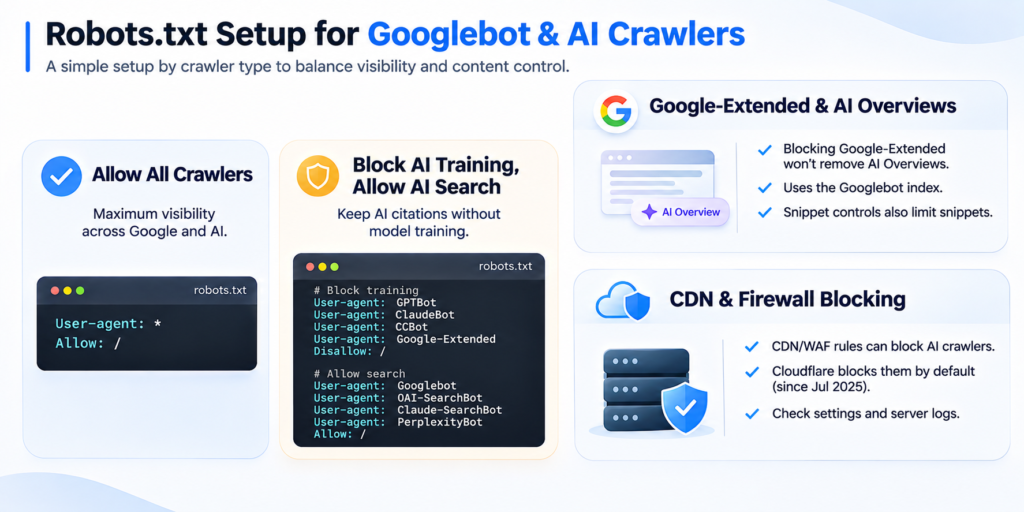
Configure robots.txt by crawler category: allow Googlebot and AI search crawlers for visibility, then allow or block training crawlers based on your content licensing position.
Allow all crawlers
- Use this setup when maximum visibility across Google and AI platforms is the goal.
- Example: User-agent: followed by Allow:
Block AI training, allow AI search
- Disallow GPTBot, ClaudeBot, CCBot, and Google-Extended.
- Allow Googlebot, OAI-SearchBot, Claude-SearchBot, and PerplexityBot.
- Your pages stay eligible for AI citations without entering model training.
Google-Extended and AI Overviews
- Blocking Google-Extended does not remove your site from AI Overviews or AI Mode.
- Both features use the Googlebot search index.
- Snippet controls (nosnippet, data-nosnippet, max-snippet) limit AI feature use but also affect regular snippets.
CDN and firewall blocking risks
- CDN and WAF bot rules block AI crawlers even when robots.txt allows them.
- Cloudflare introduced default AI crawler blocking for new domains in July 2025.
- Check both management settings after every security update.
- Confirmed in server logs that allowed crawlers to receive 200 status codes.
Can AI Crawlers Read JavaScript Content?
Most AI crawlers cannot read JavaScript content. GPTBot, ClaudeBot, and PerplexityBot read only the initial HTML response, so content loaded by client-side JavaScript stays invisible to them. Googlebot renders JavaScript, but rendering can be delayed.
How to test what AI crawlers see
Open “View Page Source” and check whether your main content and links appear in the raw HTML. Compare it with the rendered DOM in browser DevTools, because any content missing from the source is invisible to AI crawlers.
Disabling JavaScript in your browser and reloading the page gives a quick visual check. For a direct test, fetch the page with curl using an AI crawler user-agent
Fixes for JavaScript rendering gaps
- Server-side rendering (SSR): The server sends fully built HTML on every request. Frameworks such as Next.js and Nuxt support it.
- Static site generation (SSG): Pages are built as HTML files at deploy time. Best for content that changes infrequently.
- Prerendering: A service serves pre-built HTML snapshots to bots. Use it as a fallback when SSR or SSG is not possible.
- HTML-first content: Place headings, body text, internal links, and structured data in the initial HTML, regardless of framework.
Which Indexing Signals Matter to Both Crawlers?
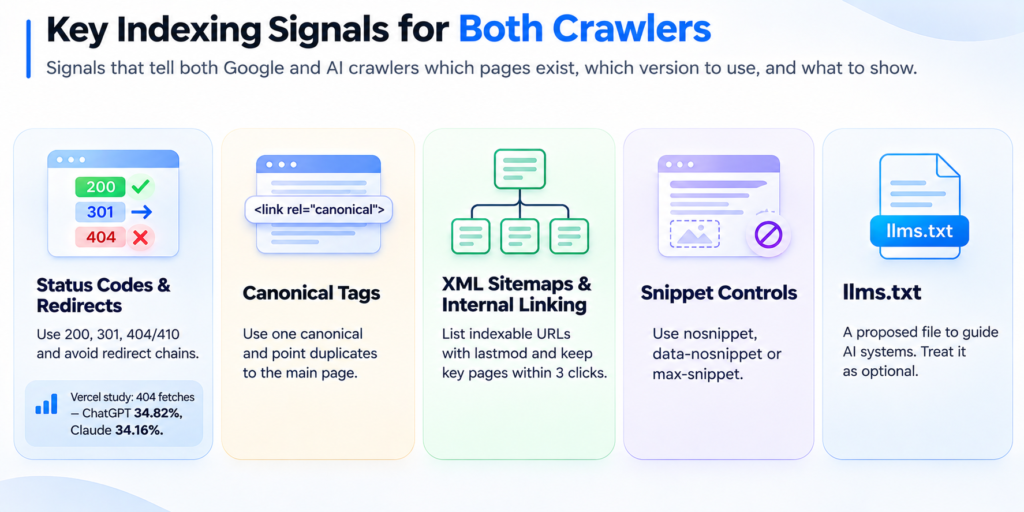
Status codes, canonicals, sitemaps, internal links and snippet controls tell both crawlers which pages exist, which version is authoritative and what they may show.
- Status codes and redirects: Return 200 for live pages, 301 for moved pages, and 404 or 410 for removed pages. Remove redirect chains. In Vercel’s AI crawler study, ChatGPT’s crawler spent 34.82% of fetches on 404 pages, and Claude spent 34.16%.
- Canonical tags: Set one self-referencing canonical per indexable page, and point duplicates to the main version.
- XML sitemaps and internal linking: List only indexable URLs with accurate lastmod dates. Keep key pages within 3 clicks of the homepage.
- Snippet controls: nosnippet, data-nosnippet, and max-snippet control AI Overviews and AI Mode, but also affect regular snippets.
- llms.txt: A proposed file for guiding AI systems. No major AI crawler has confirmed using it, so treat it as optional.
Does Structured Data Help Pages Appear in AI Answers?
Structured data helps machines identify entities, but it is not a requirement for AI answers. Google states that there is no special schema.org structured data needed to appear in AI Overviews or AI Mode. Schema still clarifies what a page is about and qualifies it for rich results.
- Useful schema types: Organisation defines your brand entity. Article marks authorship and publish dates.Product, LocalBusiness, and BreadcrumbList describe offers, locations, and site hierarchy. Keep schema values consistent with visible page content.
- Content structures that help AI extraction: Use question-based headings followed by a direct answer in the first 40 to 60 words. Our guide to SEO content writing for AI citations covers this format in more detail.Present comparisons in HTML tables, not images. Keep entity names consistent across the site, and write one idea per paragraph so each section can be quoted on its own.
How Do You Verify and Monitor Crawlers in Server Logs?
Verify crawlers by IP address, not user-agent, then segment logs by crawler type. Any bot can fake a user-agent.
- Verifying real bots: For Googlebot, a reverse DNS lookup should resolve to googlebot.com or google.com, and a forward lookup should return the same IP. For AI crawlers, match the IP against the operator’s published ranges, such as those from OpenAI and Perplexity.
- What to track in log files: Track hits per crawler, status codes served, crawl waste on parameter URLs, the pages AI crawlers request most and server load from high-volume bots.
How Do You Measure Visibility in Google and AI Search?
Measure Google AI visibility in Search Console and AI assistant visibility through analytics referrals.
Google Search Console Reports
The Generative AI report under Performance shows impressions from AI Overviews and AI Mode by page, country, device and date. It does not include clicks or CTR. Use the Page Indexing and Crawl Stats reports to confirm Googlebot access.
AI Referral Tracking in Analytics
Segment referrals from chatgpt.com, perplexity.ai, claude.ai, gemini.google.com, and copilot.microsoft.com, then track landing pages and conversions. Some AI visits appear as direct traffic, so treat the numbers as a minimum.
Technical SEO Checklist for Googlebot and AI Crawlers
Use this 10-point technical SEO checklist to keep your site accessible, readable, and measurable for both Googlebot and AI crawlers.
- Set robots.txt rules by crawler category: Allow Googlebot and AI search crawlers; decide on training crawlers.
- Audit CDN and firewall bot settings: Confirm allowed crawlers are not blocked at the network level.
- Place critical content in raw HTML: Use SSR, static generation, or prerendering for JavaScript sites.
- Fix status codes and redirect chains: Remove 404s, soft 404s, and multi-hop redirects.
- Set self-referencing canonicals: Point duplicate and parameter URLs to the main version.
- Update the XML sitemap: Include only indexable URLs with accurate lastmod dates.
- Keep key pages within 3 clicks: Use descriptive internal anchor text
- Apply snippet controls selectively: Use them only where you need to limit AI feature visibility.
- Add relevant schema markup: Match schema values to visible page content.
- Review logs and reports monthly: Check crawler activity, Search Console’s Generative AI report, and AI referral traffic.
Frequently Asked Questions
How Long Do Robots.txt Changes Take to Apply?
About 24 hours. Google caches robots.txt for up to 24 hours, and changes can take about 24 hours to apply for OAI-SearchBot.
Can I Opt Out of AI Overviews Without Leaving Google Search?
Yes. A Search Console control lets sites block their content from AI Overviews, AI Mode, and AI Overviews in Discover, while regular search results stay unaffected.
Does Page Speed Affect AI Crawlers?
Yes. Slow responses and timeouts reduce how many pages any crawler fetches. AI crawlers depend mainly on fast, complete HTML responses.