GA4 and Google Search Console will never show identical numbers, and they were never meant to. GSC counts clicks and impressions from Google Search results at the SERP level, before a visitor ever reaches your site. GA4 counts sessions and behavior after a page loads, across every channel that sends you traffic, not just Google Search. Two different measurement points, two different scopes, two different answers by design.
Once you see the gap for what it actually is, the mismatch stops being confusing and starts being useful. Each tool is authoritative for exactly one half of the journey, and the distance between them is itself a signal worth reading. Here’s exactly why the two diverge and which one to trust for what.
Why GA4 and Search Console Are Built to Disagree
The two tools aren’t reporting different versions of the same event. They’re reporting two entirely different events that happen to be connected by the same click.
What Search Console Actually Measures
Search Console measures what happens on Google’s side of the search results page. A “click” is logged the instant someone selects your listing in Google Search, across web, image, video, News, and Discover results. This measurement happens server-side, inside Google’s own infrastructure, before your website has any involvement at all. GSC also counts clicks to non-HTML files like PDFs, since those can appear directly in search results.
What GA4 Actually Measures
GA4 measures what happens after a visitor lands on your site. A “session” starts once your JavaScript tracking tag fires in the visitor’s browser and stays open for 30 minutes of inactivity by default. This is client-side measurement, and it depends entirely on the page loading successfully and the tracking script running without interference. GA4 also tracks this behavior across every acquisition channel, not just organic search, which is why its scope is so much wider than GSC’s.
Clicks vs Sessions: The Core Mismatch
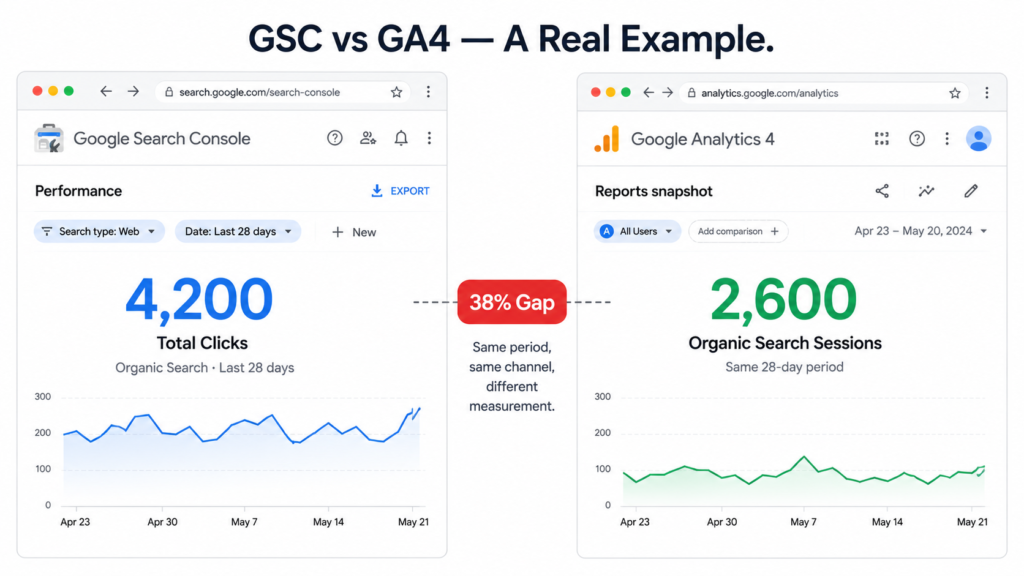
The most common source of confusion is treating a GSC click and a GA4 session as two measurements of the same thing. They aren’t. A click is a single, discrete event recorded the moment someone taps a search result. A session is a behavioral window that only opens if the page actually loads and the tracking script actually runs.
Why One GSC Click Doesn’t Always Become One GA4 Session
Several everyday scenarios create a click with no matching session:
- A user clicks your result, then hits the back button before the page finishes loading. GSC logs the click. GA4 never fires.
- A user has an ad blocker or privacy extension that blocks GA4’s tracking script outright. The click happened. The session doesn’t exist.
- JavaScript is disabled in the visitor’s browser. Rare, but it produces the same outcome: a click with nothing behind it in GA4.
The reverse can also happen. If a user clicks, leaves, and returns directly later within GA4’s six-month attribution lookback window, GA4 can credit that later visit back to organic search, producing a session that has no corresponding click in that day’s GSC report.
The data: According to Primary Position’s 2025 analysis of global websites, GSC-to-GA4 discrepancies of 50% or more are increasingly common, with a typical baseline gap of 20-30% even before accounting for consent-related filtering. On some sites, GSC now reports roughly double what GA4 records for the same period.
Consent Mode and Attribution Thresholds
This is the single biggest driver of the widening gap between the two tools, and it’s the one most explanations skip entirely.
How Cookie Consent Rejection Shrinks GA4’s Count
When a visitor declines analytics cookies under Consent Mode v2, GA4 blocks its tracking hit for that visitor entirely, and the session simply doesn’t get recorded. GSC has no equivalent mechanism. It logs the click at the search-result level, on Google’s side, regardless of what the visitor does or doesn’t consent to on your site afterward. The click happened before your banner ever appeared, so nothing on your site can take it back.
Sites with heavy EU or UK traffic tend to see the largest gaps here, since cookie consent banners are a legal requirement in those regions and a meaningful share of visitors decline. GA4 does apply behavioral modeling to estimate some of this lost data, but modeled numbers are estimates, not measurements, and they rarely close the gap completely
Data Thresholding in GA4
Separately from consent, GA4 applies data thresholding to protect user privacy in smaller data sets. When a segment of traffic is too small, GA4 may withhold or partially model that data rather than report it directly, something that shows up especially often in GA4’s Search Console integration reports, where the query-level detail can be thin to begin with.
Even without any of the technical measurement differences above, the two tools would still disagree simply because they’re counting different populations.
GSC’s Scope: Google Search Only
Search Console only sees traffic that originates from Google Search. It has no visibility into direct visits, social traffic, email campaigns, paid search, or referral traffic from other sites. If a page ranks well but gets most of its real-world traffic from a newsletter, GSC will never reflect that.
GA4’s Scope: Every Channel, Every Session
GA4 sees everything: organic search, direct, social, email, paid, referral, and more, all rolled into one reporting system. Even when you filter GA4 down to the organic search channel specifically, it’s still counting a session-based, cross-device, cross-visit view of behavior that GSC was never designed to capture.
Processing Delays: Why “Right Now” Never Matches
Even on a day when nothing else has gone wrong, checking both tools at the same moment can produce two different pictures simply because of timing.
Search Console’s Reporting Lag
Search Console data isn’t real-time. It typically lags by two to three days before performance data is fully available, and Google has noted delays can extend further in some cases. Comparing today’s GA4 numbers to today’s GSC numbers is comparing a finished report to one that hasn’t been written yet.
GA4’s Real-Time vs Standard Reporting Gap
GA4 has its own internal timing inconsistency. Its real-time report and its standard reports can show different numbers for the same period, since standard reports incorporate additional processing, deduplication, and modeling that the real-time view doesn’t have time to apply. Pulling from the wrong GA4 report while comparing against GSC adds a second layer of mismatch on top of the first.
Once you stop expecting the two tools to agree, the practical question becomes simple: which one answers the specific question you’re actually asking.
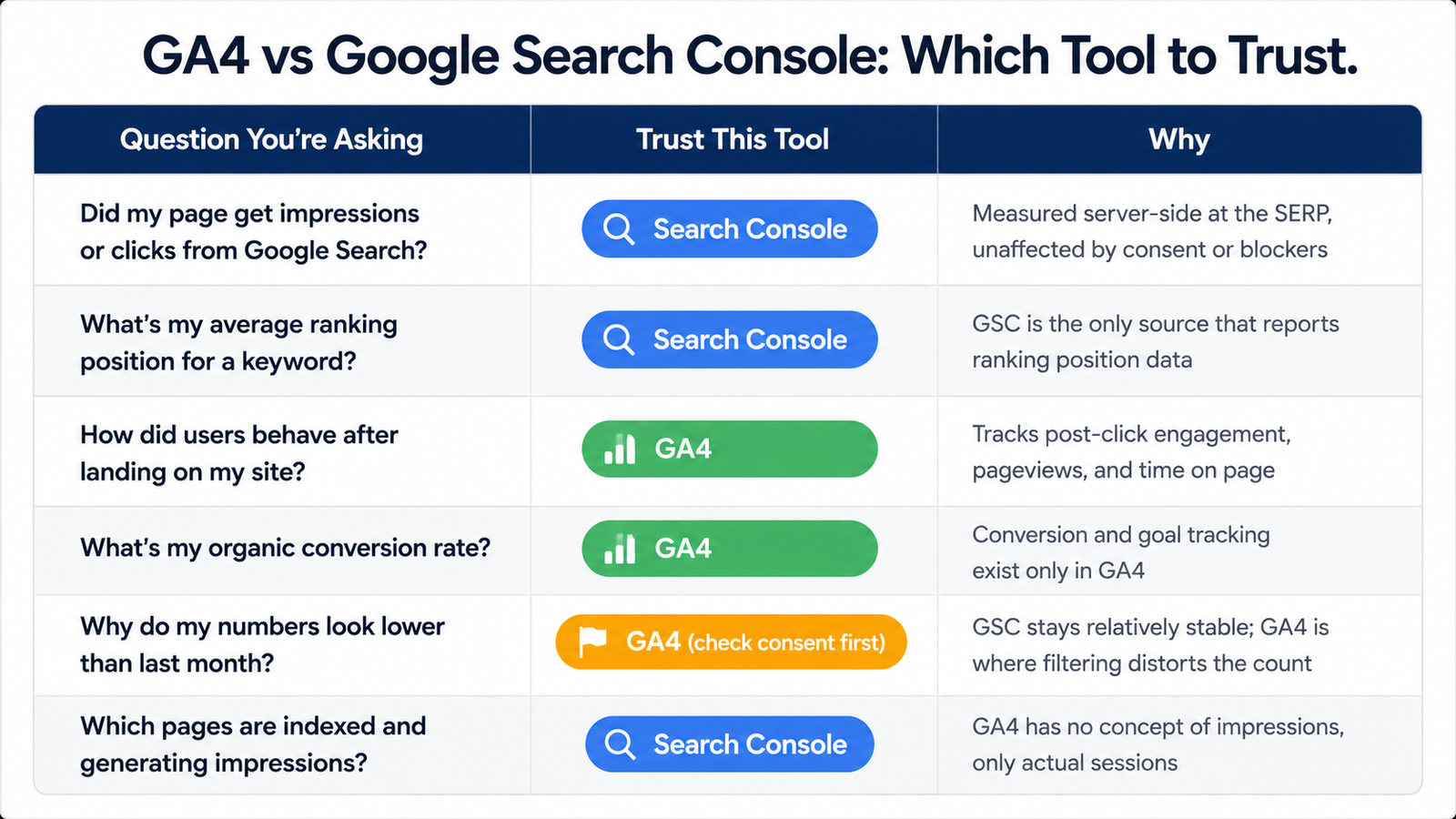
| Question You’re Asking |
Trust This Tool |
Why |
| Did my page get impressions or clicks from Google Search? |
Search Console |
Measured server-side at the Google Search results page (SERP), so it isn’t affected by consent settings or ad blockers. |
| What’s my average ranking position for a keyword? |
Search Console |
Google Search Console is the only source that provides keyword ranking position data. |
| How did users behave after landing on my site? |
GA4 |
GA4 measures post-click behavior, including engagement, pageviews, events, and average engagement time. |
| What’s my organic conversion rate? |
GA4 |
Conversions, key events, and goal tracking are available only in GA4—not in Search Console. |
| Why do my numbers look lower than last month? |
GA4 (check consent mode and thresholding first) |
Search Console data is generally stable. GA4 can show lower numbers because of consent mode, thresholding, ad blockers, and reporting models. |
| Which pages are indexed and generating impressions? |
Search Console |
GA4 has no concept of search impressions or indexing. It only records visits after someone reaches your website. |
Common Mistakes When Comparing GA4 and GSC
- Comparing GSC clicks directly to GA4 sessions, as if they measure the same event. They measure two different moments in the same visitor journey.
- Ignoring consent mode’s impact on the gap, and assuming a sudden drop in GA4 sessions means something broke when it may simply reflect more visitors declining cookies.
- Not aligning date ranges before comparing, given GSC’s multi-day reporting lag against GA4’s near-real-time data.
When the Gap Signals a Real Problem (Not Just Normal Variance)
Everything above explains why a gap exists. It doesn’t mean every gap is fine to ignore. There’s a difference between the structural mismatch this article covers and a genuine tracking problem sitting underneath it.
A steady 20-30% gap that holds roughly constant month over month, with the usual spike around regions with strict consent requirements, is the expected baseline. That’s Consent Mode v2, scope differences, and normal click-to-session friction doing exactly what they always do. Nothing to fix there.
What’s worth investigating instead:
- A sudden jump in the gap with no matching change in traffic mix or geography. If your audience composition hasn’t shifted and the gap widens sharply in a single reporting period, check whether your GA4 tag fired correctly across your templates or whether a recent site change broke tracking on specific page types.
- GA4 showing zero sessions for pages GSC confirms are getting clicks. This usually points to a missing or duplicated GA4 tag, a caching issue serving a stale page version without the tracking script, or a redirect chain that drops the tracking parameter before the page loads.
- A gap that only shows up on certain page templates, not site-wide. If your blog reconciles fine but your product pages show an unusually wide gap, the tag implementation is the first place to look, not consent behavior.
- A gap that reversed direction unexpectedly, with GA4 suddenly reporting more sessions than GSC reports clicks for the same URL and date range, beyond what a six-month attribution lookback would normally explain. This is worth a filter and segment audit in GA4, since misconfigured segments can inflate or misattribute session counts.
The rule of thumb: if the gap’s size and behavior stay consistent with what Consent Mode v2, scope, and click-versus-session logic would predict, it’s structural and expected. If the gap moves in ways that don’t track with any of those known causes, it’s a tracking implementation issue, not a reporting quirk, and it deserves a proper technical audit before you draw any conclusions from either tool’s numbers.
How to Reconcile the Numbers (Practical Checklist)
- Filter GA4 to the Organic Search channel specifically before comparing anything against GSC.
- Align date ranges to account for Search Console’s reporting lag rather than comparing same-day figures.
- Treat the GSC-to-GA4 gap as a permanent, structural difference between two measurement systems, not a bug that needs fixing.
- Use Search Console for discovery and ranking questions, and GA4 for behavior and conversion questions. Avoid cross-comparing the raw numbers as if one should validate the other.
Getting comfortable with this gap is really just the first step. If GA4’s numbers themselves are shifting under you for reasons beyond GSC comparisons entirely, that’s a broader measurement problem worth understanding on its own.
Explaining the Gap to Clients and Stakeholders
This mismatch comes up constantly in monthly reporting, and it’s usually the first question a client asks when they open both dashboards side by side. The way you frame it matters as much as the technical explanation itself.
Lead with the reassurance, then the reason. Start by confirming the gap is expected and doesn’t indicate lost traffic or broken tracking, then walk through the specific cause relevant to that client’s situation. A client with heavy EU traffic will care most about Consent Mode v2. A client with a lot of PDF or document results in search will care more about GSC’s broader scope. Match the explanation to what’s actually driving their gap, rather than reciting every possible cause every time.
Show the gap as a range, not a single number. Since Consent Mode v2’s effect varies with each visitor’s consent choice, the exact percentage will shift slightly month to month even with stable traffic. Present it as a normal range for that site rather than a fixed figure, so a small month-to-month change doesn’t trigger unnecessary concern.
Anchor the conversation in the “which tool for what” framing. Rather than trying to reconcile the two numbers into one, shift the conversation to what each tool is answering. A client asking “why don’t my numbers match” is often really asking “am I losing traffic,” and the honest answer is usually no. Reframing the conversation around ranking performance (GSC) versus on-site outcomes (GA4) usually resolves the concern faster than any amount of technical detail about tagging or consent frameworks.
Keep a standing reference ready. Since this question repeats every reporting cycle, keeping the “which tool to trust” table from this article on hand, or linking clients directly to it, saves rebuilding the explanation from scratch each time it comes up.
FAQs
-
Why does GA4 show fewer sessions than Search Console clicks?
Consent Mode v2 blocks GA4’s tracking tag for visitors who decline cookies, while GSC continues logging every click server-side regardless of consent. Ad blockers, disabled JavaScript, and quick back-button exits also produce clicks with no matching GA4 session.
-
Is it normal for GSC and GA4 to never match exactly?
Yes. The two tools measure different events, a pre-click search result selection versus a post-load browser session, across different scopes, with different processing delays. A permanent gap is expected, not a sign of broken tracking.
-
Which tool is more accurate, GA4 or Search Console?
Neither is more “accurate” in an absolute sense; they’re accurate for different questions. GSC is the reliable source for search visibility and ranking data. GA4 is the reliable source for on-site behavior and conversion data.
-
Does consent mode affect Search Console data too?
No. Search Console logs clicks at the search-result level on Google’s side, independent of any cookie consent decision made on your website. Only GA4’s client-side tracking is affected by consent choices.